


Maintenance and troubleshooting
The LI-300 and LI-350 are not user-serviceable. The devices will not require maintenance beyond cleaning and changes to the configuration and calibration settings.
Cleaning the sensor
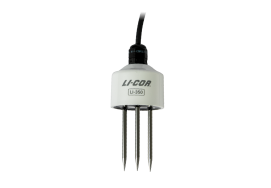
Oils from skin can be deposited while handling, and this may affect the measurement accuracy. If the tines are dirty (soil from a prior installation or oil from any source, including hands), clean them with a mild detergent, water, and a soft cloth. Rinse the sensor with tap or deionized water after cleaning.
Caution: Do not touch the tines with bare hands and do not allow them to come into contact with oils or other non-conductive residues. Oily deposits can affect the measurement accuracy. Clean the tines with mild detergent and rinse with water until clean.
Warning: Puncture hazard. Tips of the tines are sharp and may cause a puncture injury. Handle probes with care and keep a protective foam cover in place when the probe is not being installed or in use.
Troubleshooting
If your sensor is not performing as expected, review these troubleshooting steps.
Readings unreasonable (too low or negative)
Low or negative readings may result from an improper setting or a poor installation.
-
Wrong soil type setting?
-
Check the soil type setting and be sure it is suitable for the soil being measured.
-
Air gaps around tines?
-
If part of a tine is in air or an air gap, or if it is within a few cm of the soil surface, the measurements may include the effects of the air, leading to low or negative readings. Air gaps can form if large solid objects in the soil become dislodged by a tine during installation or if the sensor is not inserted fully. Check the installation to confirm that there are no air gaps and that the tines are not too close to the surface.
-
Something besides soil in the measurement volume?
-
Roots and rocks in the volume of sensitivity around the sensor can affect the measurement. You can install the sensor in a different place, collect a larger sample size, or take other steps to ensure that the data collected represents your measurement goals.
-
If using a custom calibration, are the coefficients correct?
-
Double check your work developing coefficients and verify that the coefficients are loaded correctly on the sensor.
Readings unreasonable (too high)
Unreasonably high readings may result from an improper setting or soil compaction.
-
Wrong soil type setting?
-
Check the soil type setting and be sure it is suitable for the soil being measured.
-
Soil excessively compacted?
-
Hard packed soil can lead to high readings. Be sure the soil being measured is representative of the site. Do not install the sensor on walking paths, roadways, or soils that have become artificially compacted.
-
If using a custom calibration, are the coefficients correct?
-
Double check your work developing coefficients and verify that the coefficients are loaded correctly on the sensor.
Reported values are 0, NAN, 99, change erratically, or do not change
Issues described below will be indicated by the SDI-12 performance (LI-350 only). If measurements are not recorded or are incorrect, check the following:
-
Device address or program address incorrect?
-
Check the device address and the address expected by the program. If they are not the same, change one so they match. All SDI-12 sensors must have a unique address. Double check device addresses to be sure there are not conflicts.
-
Sensor not powered?
-
Be sure the power wire is connected to the power supply. Check the power supply voltage with a voltmeter to be sure it is providing enough power.
-
Data wire not connected?
-
Check the data wire to be sure it is connected to the correct channel.