


Initial assembly
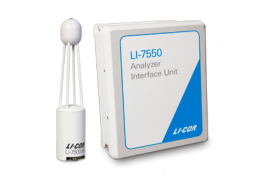
This section covers the basic steps you will follow to assemble the LI-7500RS for the first time. You'll need the analyzer head, LI-7550, Temperature Sensor, SmartFlux Core System, and the accessories.
Preparing the enclosure
Start by assembling the enclosure hardware. Keep the main power cable disconnected from the power source or de-energize the power source until the component wiring is complete, and leave the breakers in the OFF position until you are ready to power on the system.
Installing the system power supply cable
Connect the main power supply conduit to the small opening in the enclosure. Orient the lock-nut teeth so that they make contact with the enclosure surface. Connect the main power supply wires to terminals 3, 4 and 5.
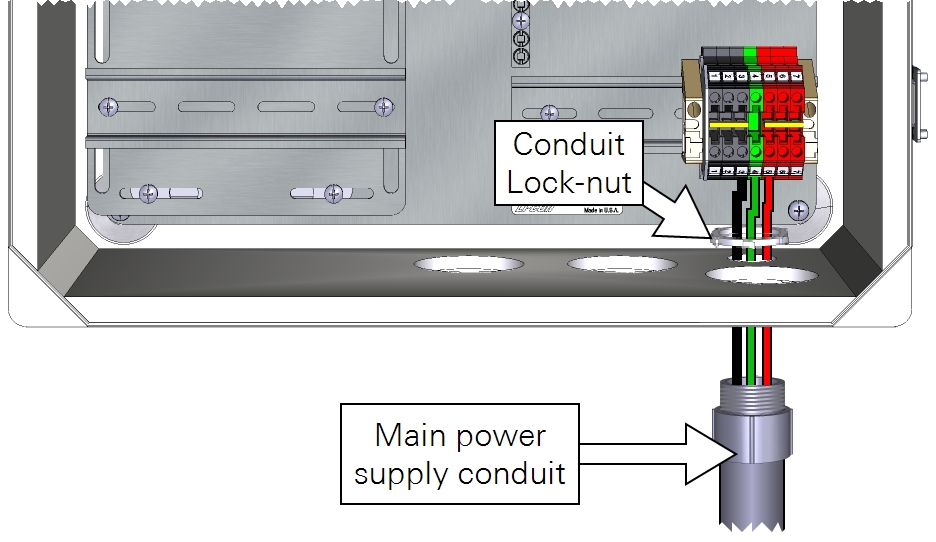
| From | Wire Color | To |
|---|---|---|
| Main power (-) | black | DIN Terminal 3 (bottom) |
| Earth ground | green | DIN Terminal 4 (bottom) |
| Main power (+) | red | DIN Terminal 5 (bottom) |
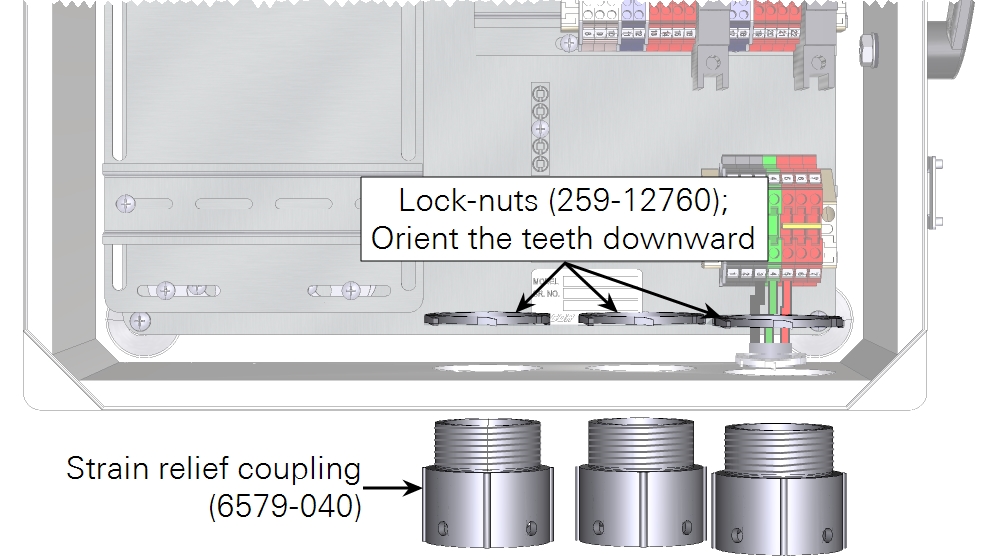
In both the eddy covariance system enclosure (7900-050) and the Biomet Data Acquisition System enclosure (7900-126), install the three strain-relief couplings in the three bottom openings.
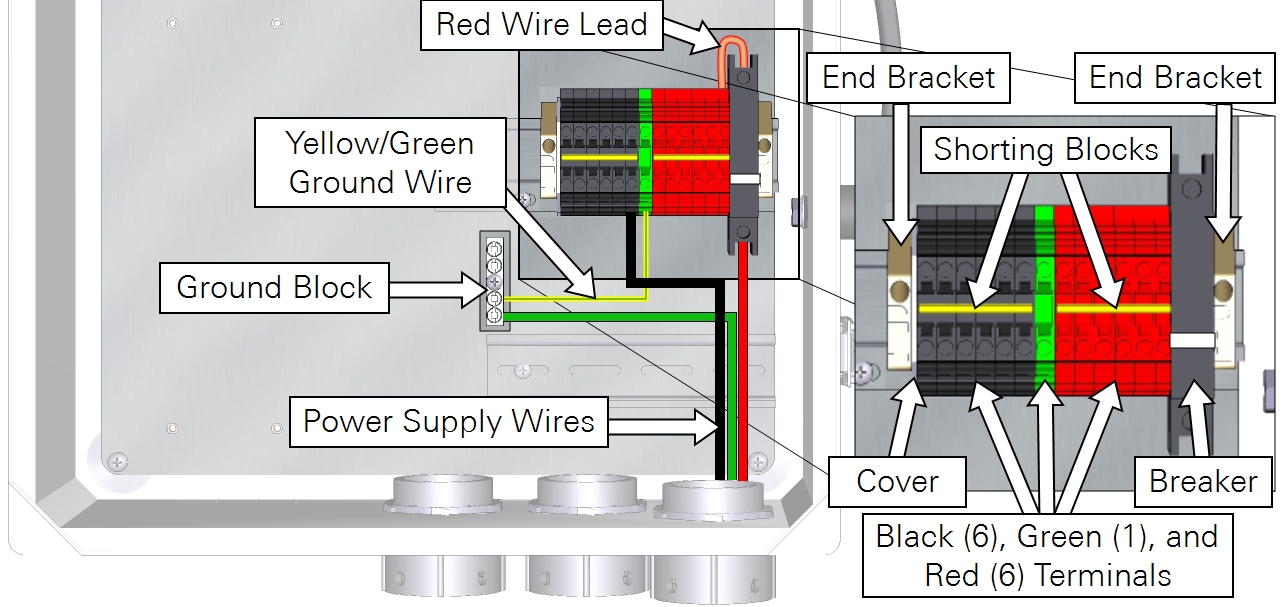
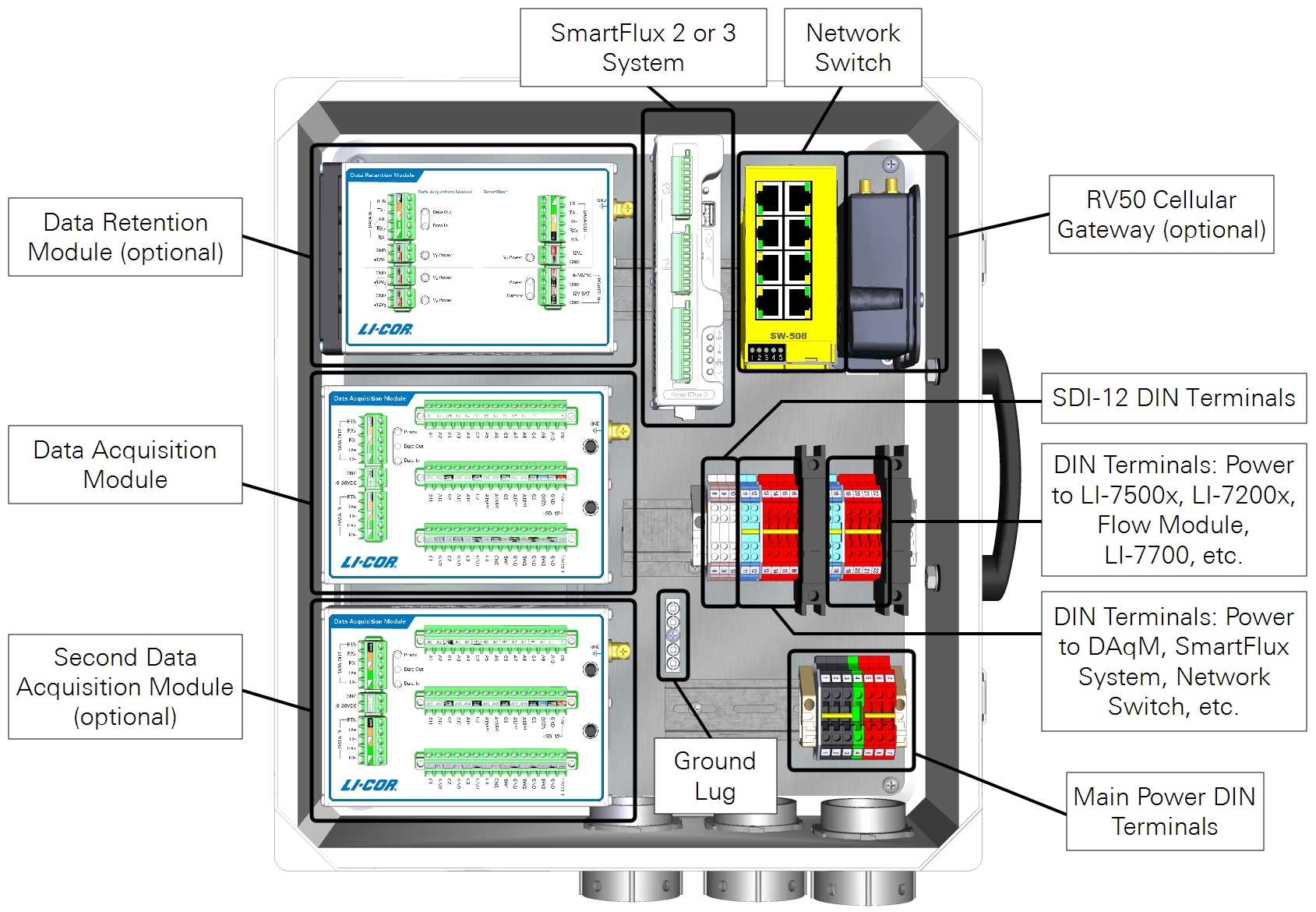
In the eddy covariance system enclosure (7900-050), install the Power Distribution Kit (7900-235) on the raised DIN rail. Connect the red wire lead between the top of the breaker and top right red terminal. Install one shorting block to connect all black terminals and another to connect all red terminals.
Preparing the SmartFlux Core System and network switch
Follow the steps below when installing the SmartFlux Core System in the 7900-050 Eddy Covariance System Enclosure or 7900-126 Biomet Data Acquisition System Enclosure. If you are using a different enclosure, connect the power and data cables similarly to what is described here.
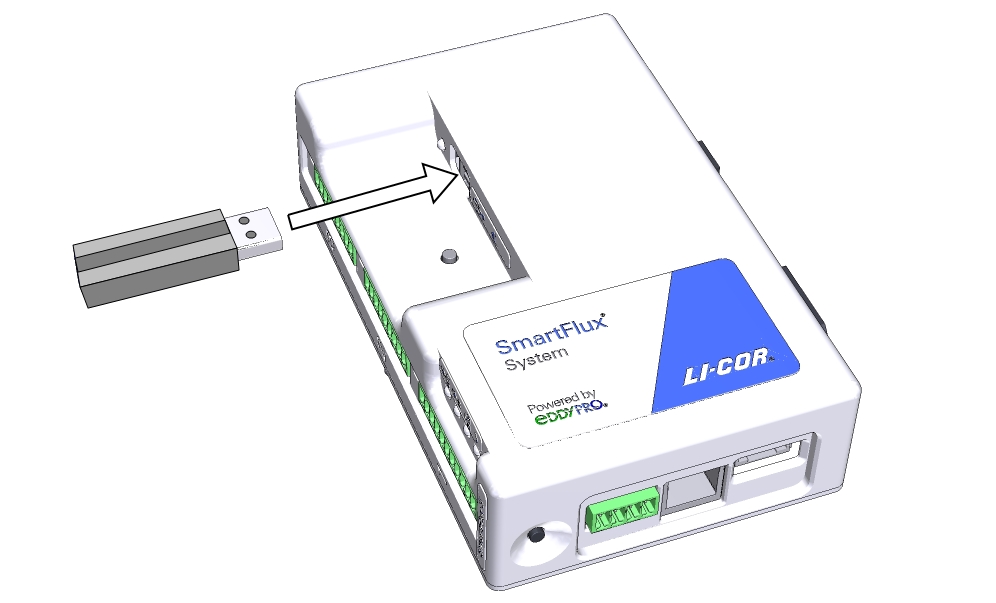
Installing the USB drive
Data are recorded to the USB drive. Install the USB drive in the USB port on the SmartFlux Core System.
Connecting the GPS antenna cable
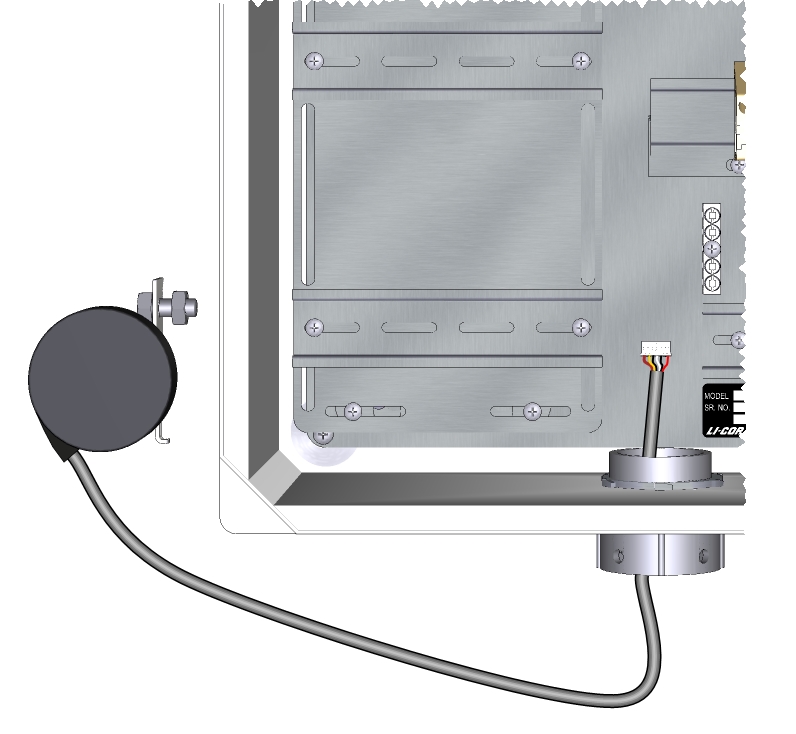
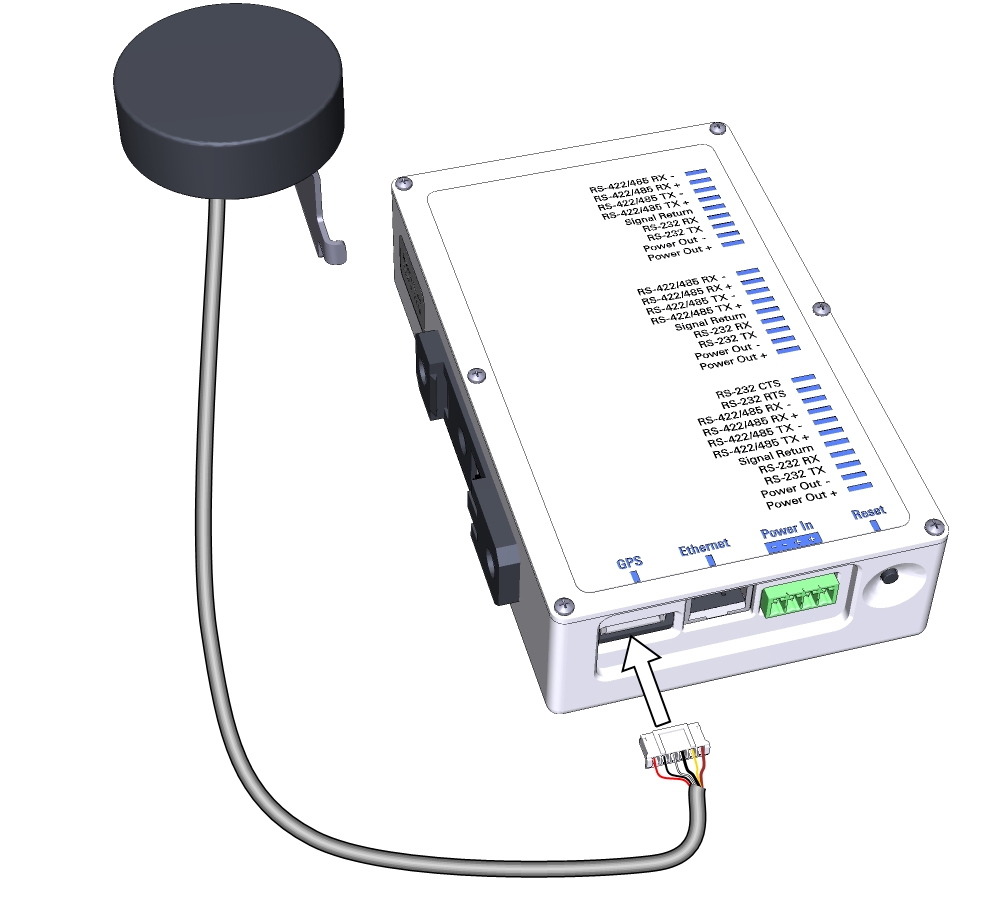
Route the GPS cable through the left opening at the bottom of the enclosure and plug it into the GPS port on the SmartFlux Core System.
Connecting power and data cables to the SmartFlux Core System
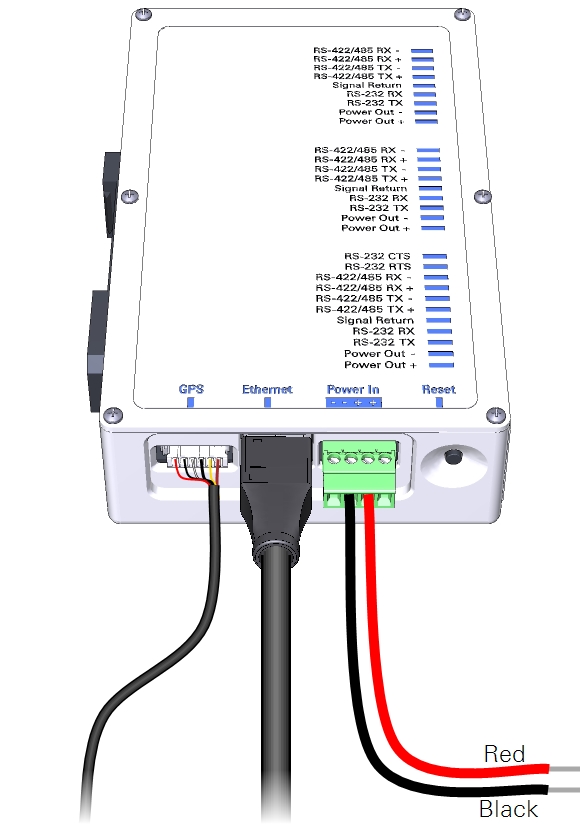
Connect wire leads to the positive and negative terminals on the SmartFlux Core System. The black lead connects to negative (-), the red lead connects to positive (+). Plug in the 30 cm Ethernet cable that came with the SmartFlux Core System. There are two connections for positive (+) and two for negative (-). Use only one pair of +/- terminals.
Connecting power wires to the Brainboxes network switch
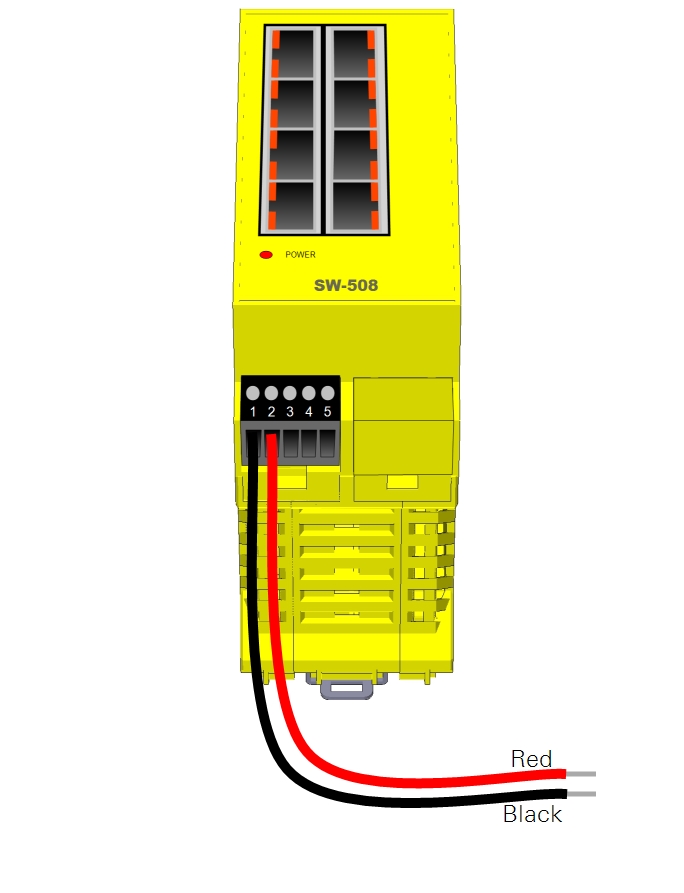
Power wires connect to the positive and negative terminals on the switch. The black lead connects to terminal 1 (-), the red lead connects to terminal 2 (+).
Installing the SmartFlux Core System and network switch
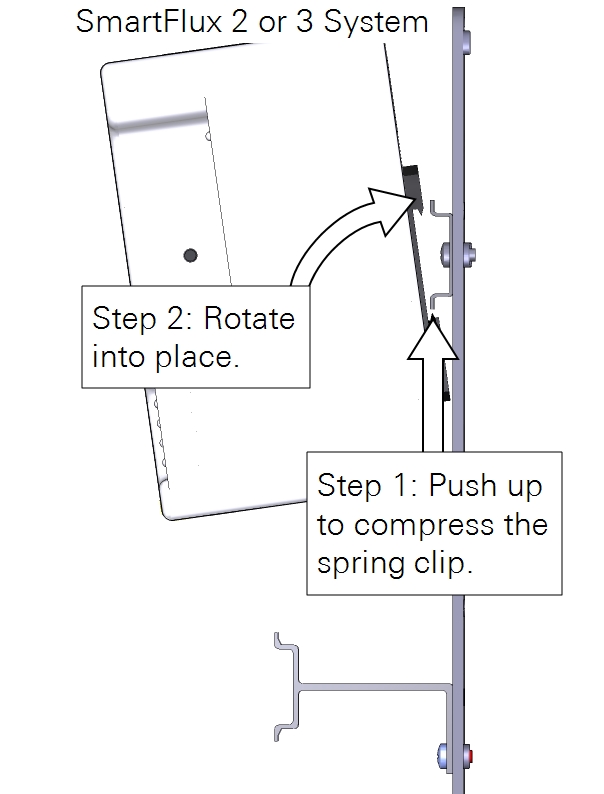
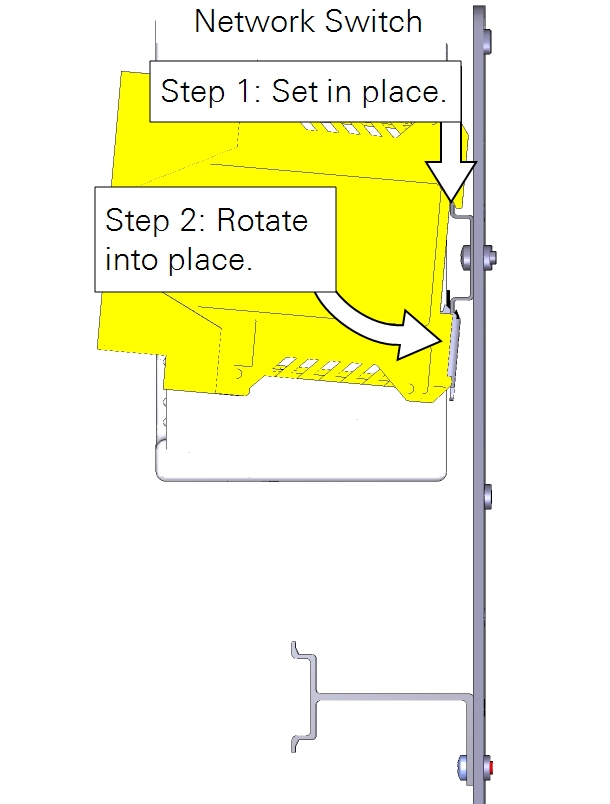
Install the SmartFlux Core System onto the left side of the upper-right DIN rail. Insert the spring-loaded clip on the bottom edge of the DIN rail and compress the spring. Rotate it into place. Mount the switch next to it.
Connecting component power wires
The 7900-050 and 7900-126 enclosures present different wiring options. Be sure the power supplied to the enclosure is within the upper voltage limits of attached components, but capable of providing 4 to 5 amps. Keep the breaker OFF while connecting power wires.
7900-050 Eddy Covariance System Enclosure
With the 7900-050 enclosure, keep the breaker OFF. Connect the positive (+) leads to red terminals and negative (-) leads to black terminals for all components of the system. Proceed to Connecting gas analyzer power wires.
7900-126 Biomet Data Acquisition System Enclosure
With the 7900-126 enclosure, each component is powered individually from the power supply terminals, the DC-DC converter, or the DRM power outputs. 24-volt and 12-volt power supplies will be wired differently.
Caution: Do not short circuit the power supplies. For example, avoid connecting the V4 POWER OUT terminals from a Data Retention Module to the Power In terminals on a device that is powered from another power supply. Doing so will damage components and may present risk of a fire.
Select the power supply option that describes your system:
- 24 VDC power supply with Data Retention Module. This configuration uses a 24 volt output from a SunWize solar power supply. The DRM provides voltage regulation for devices that are not compatible with a 24 volt power supply.
- 12 VDC power supply with Data Retention Module. With a 12 volt power supply, no voltage regulator is needed.
- 12 VDC power supply with no Data Retention Module. With a 12 volt power supply, no voltage regulator is needed.
- 24 VDC power supply with the TDK-Lambda DC-DC converter. With a 24 volt power supply and no Data Retention Module, the TDK-Lambda voltage regulator should be used to power devices that have maximum power supply limits lower than 24 VDC.
24 VDC power supply with Data Retention Module
 Read more
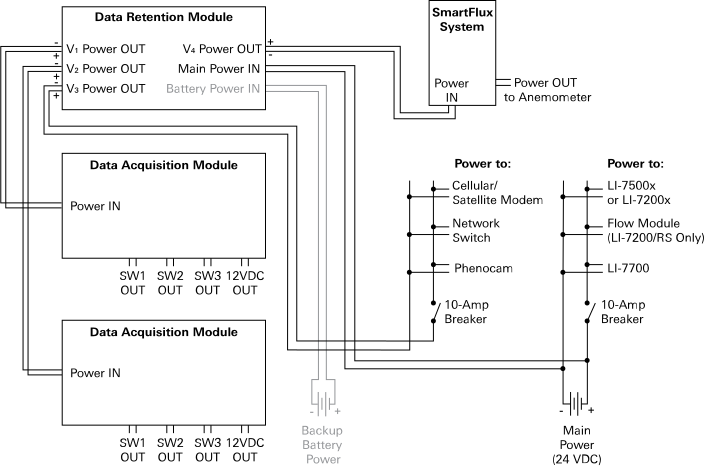
With a 24 VDC power supply, the DRM V3 power outputs can be used to power low-voltage components through the left 10-amp breaker and DIN terminals. Components powered in this manner include the network switch, PhenoCam, cellular gateway, satellite modem, CNF4 heater and ventilation unit (for the CNR4), or self-calibrating soil heat flux plates (HFP01SC).
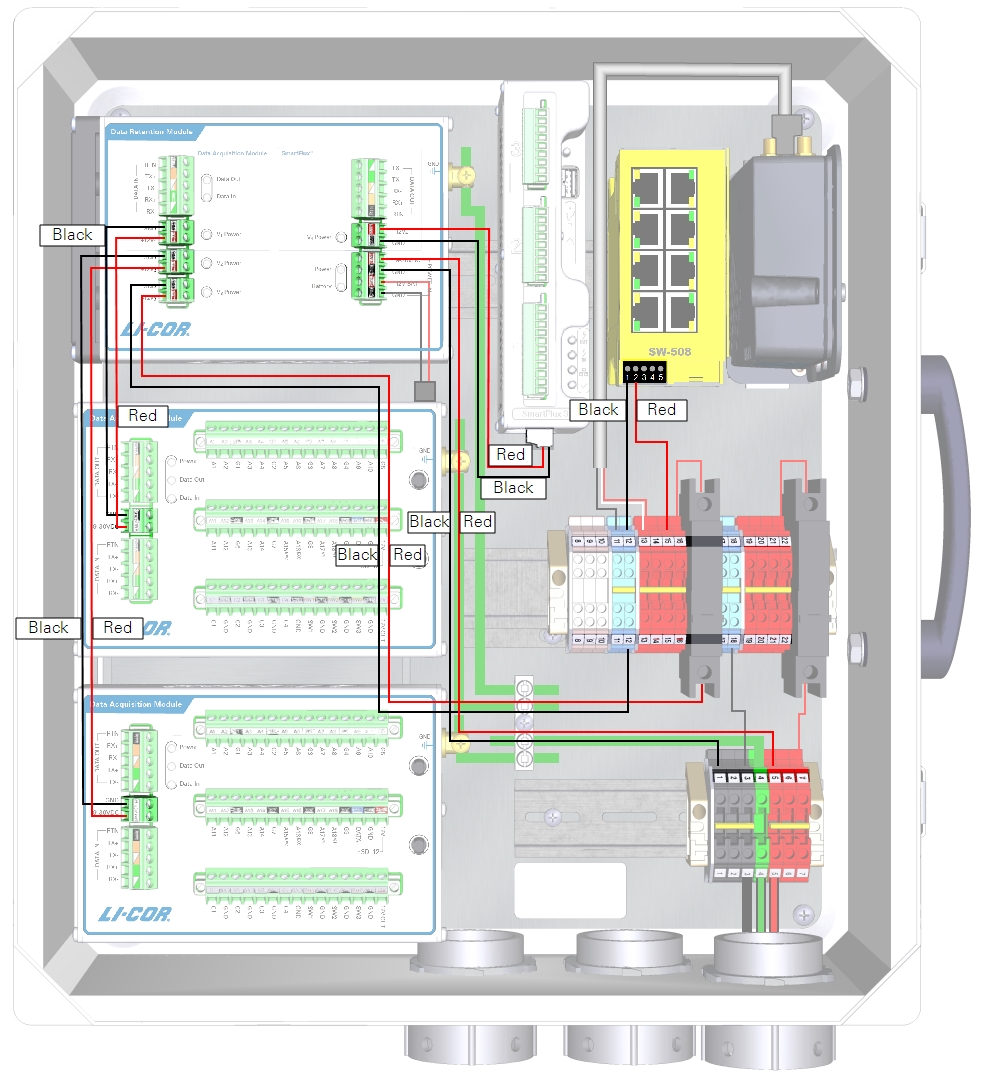
| From | Wire Color | To |
|---|---|---|
| DRM and DAqM Ground Lugs | yellow/green | Enclosure Ground Lug |
| DIN Terminal 1 (top) | black | DRM POWER IN GND (-) |
| DIN Terminal 5 (top) | red | DRM POWER IN +9-30 VDC (+) |
| DRM V1 Power GND | black | DAqM 1 GND (-) |
| DRM V1 Power +12V1 | red | DAqM 1 PWR (+) |
| DRM V2 Power GND | black | DAqM 2 GND (-) |
| DRM V2 Power +12V2 | red | DAqM 2 PWR (+) |
| DRM V3 Power GND | black | DIN Terminal 12 (bottom) |
| DRM V3 Power +12V3 | red | Left Breaker (bottom) |
| DRM V4 Power GND | black | SmartFlux Core System (-) |
| DRM V4 Power +12 V4 | red | SmartFlux Core System (+) |
| DIN Terminal 12 (top) | black | Network Switch (-) |
| DIN Terminal 15 (top) | red | Network Switch (+) |
| DIN Terminal 11 (top) | black | Cellular/Satellite Modem (-) |
| DIN Terminal 13 (top) | red/white | Cellular/Satellite Modem (+) |
12 VDC power supply with Data Retention Module
Read more
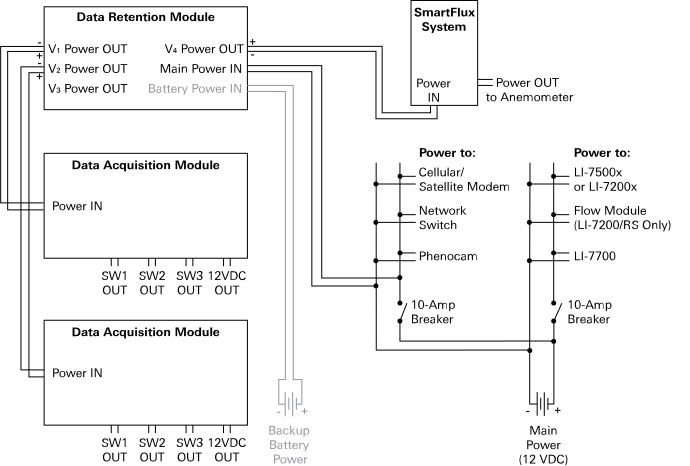
With a 12 VDC power supply, you do not need to connect the DRM power out to the breaker or terminal strips because 12 VDC is within the limits of all components.
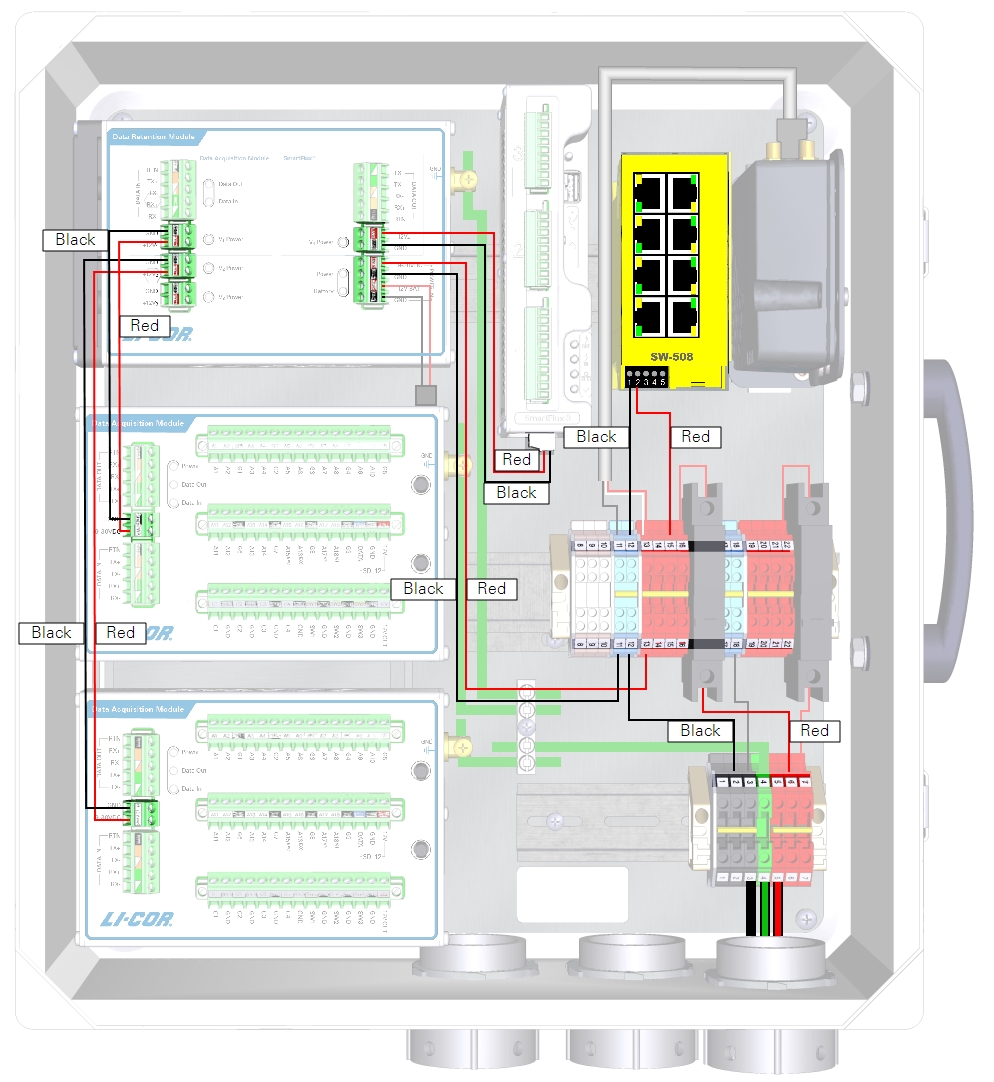
| From | Wire Color | To |
|---|---|---|
| DRM and DAqM Ground Lugs | yellow/green | Enclosure Ground Lug |
| DIN Terminal 11 (bottom) | black | DRM POWER IN GND (-) |
| DIN Terminal 13 (bottom) | red | DRM POWER IN +9-30 VDC (+) |
| DRM V1 Power GND | black | DAqM 1 GND (-) |
| DRM V1 Power +12V1 | red | DAqM 1 PWR (+) |
| DRM V2 Power GND | black | DAqM 2 GND(-) |
| DRM V2 Power +12V2 | red | DAqM 2 PWR (+) |
| DRM V4 Power GND | black | SmartFlux Core System (-) |
| DRM V4 Power +12 V4 | red | SmartFlux Core System (+) |
| DIN Terminal 12 (top) | black | Network Switch (-) |
| DIN Terminal 15 (top) | red | Network Switch (+) |
| DIN Terminal 11 (top) | black | Cellular/Satellite Modem (-) |
| DIN Terminal 13 (top) | red/white | Cellular/Satellite Modem (+) |
12 VDC power supply with no Data Retention Module
Read more
If your system does not have a Data Retention Module, the SmartFlux Core System will be powered from the enclosure power terminals rather than the DRM power outputs.
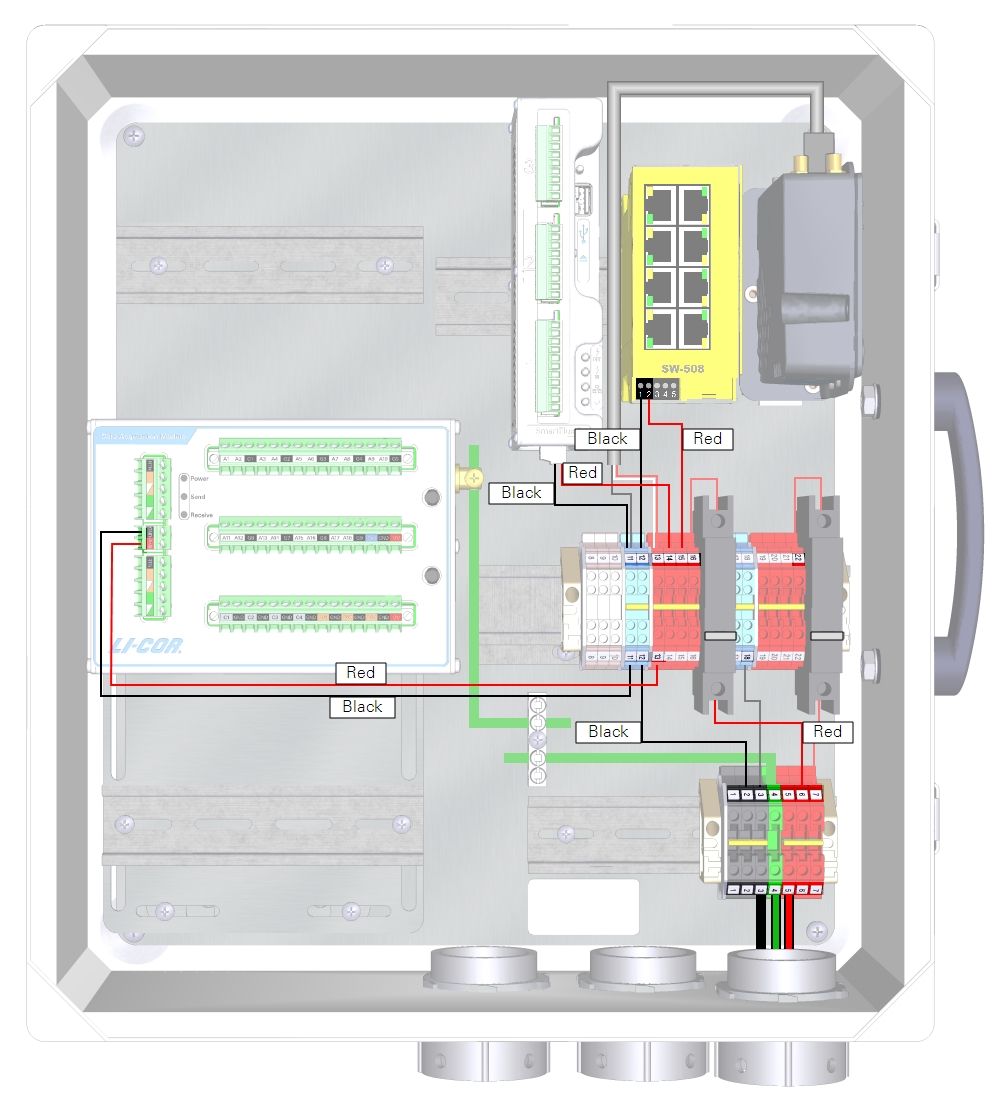
| From | Wire Color | To |
|---|---|---|
| DRM and DAqM Ground Lugs | yellow/green | Enclosure Ground Lug |
| DIN Terminal 11 (bottom) | black | DAqM GND (-) |
| DIN Terminal 13 (bottom) | red | DAqM PWR (+) |
| DIN Terminal 11 (top) | black | SmartFlux Core System GND (-) |
| DIN Terminal 14 (top) | red | SmartFlux Core System (+) |
| DIN Terminal 12 (top) | black | Network Switch (-) |
| DIN Terminal 15 (top) | red | Network Switch (+) |
| DIN Terminal 11 (top) | black | Cellular/Satellite Modem (-) |
| DIN Terminal 13 (top) | red/white | Cellular/Satellite Modem (+) |
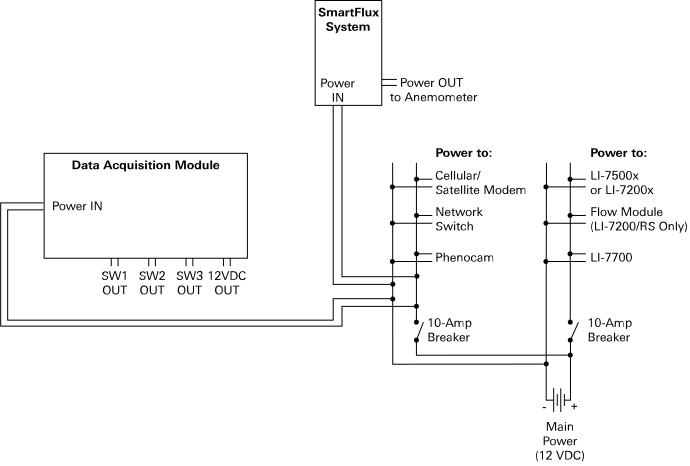
24 VDC power supply with the TDK-Lambda DC-DC converter
Read more
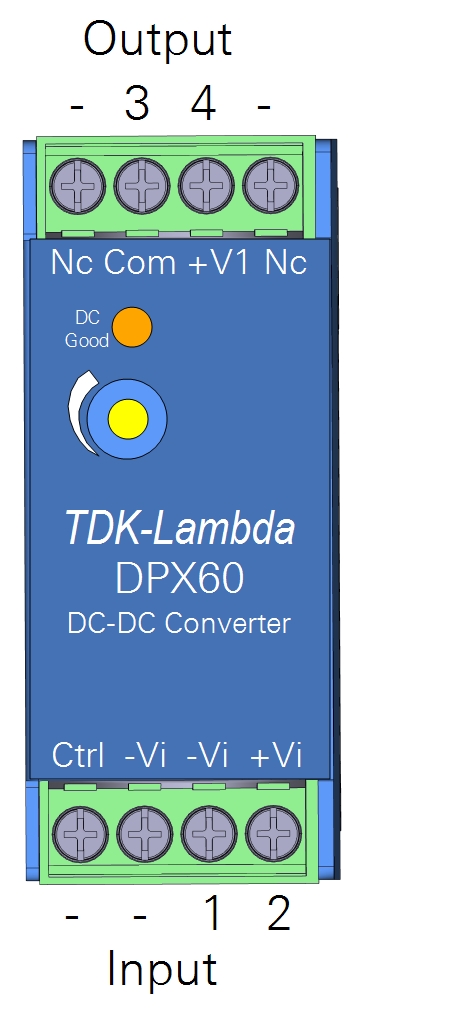
The TDK-Lambda DC-DC Converter (model DPX60) regulates output voltage to about 12 VDC, which makes it possible to power low-voltage devices from a 24 VDC solar power supply. The DC-DC converter should be used to power the left 10-amp accessory breaker (and the SmartFlux Core System) if you have a 24 VDC power supply and no DRM.
Full documentation for the TDK-Lambda DC-DC converter is available from the manufacturer's website: www.us.lambda.tdk.com/.
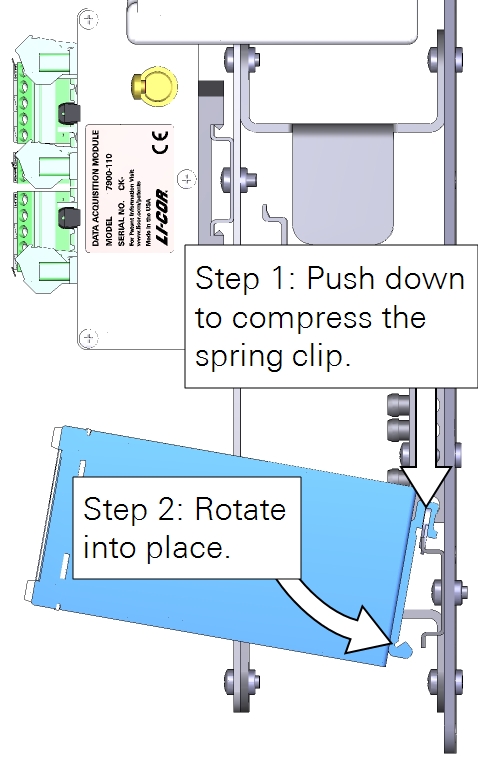
The DC-DC converter mounts to a DIN rail in the lower right of the enclosure. Compress the spring in the DIN clip and rotate the converter into place.
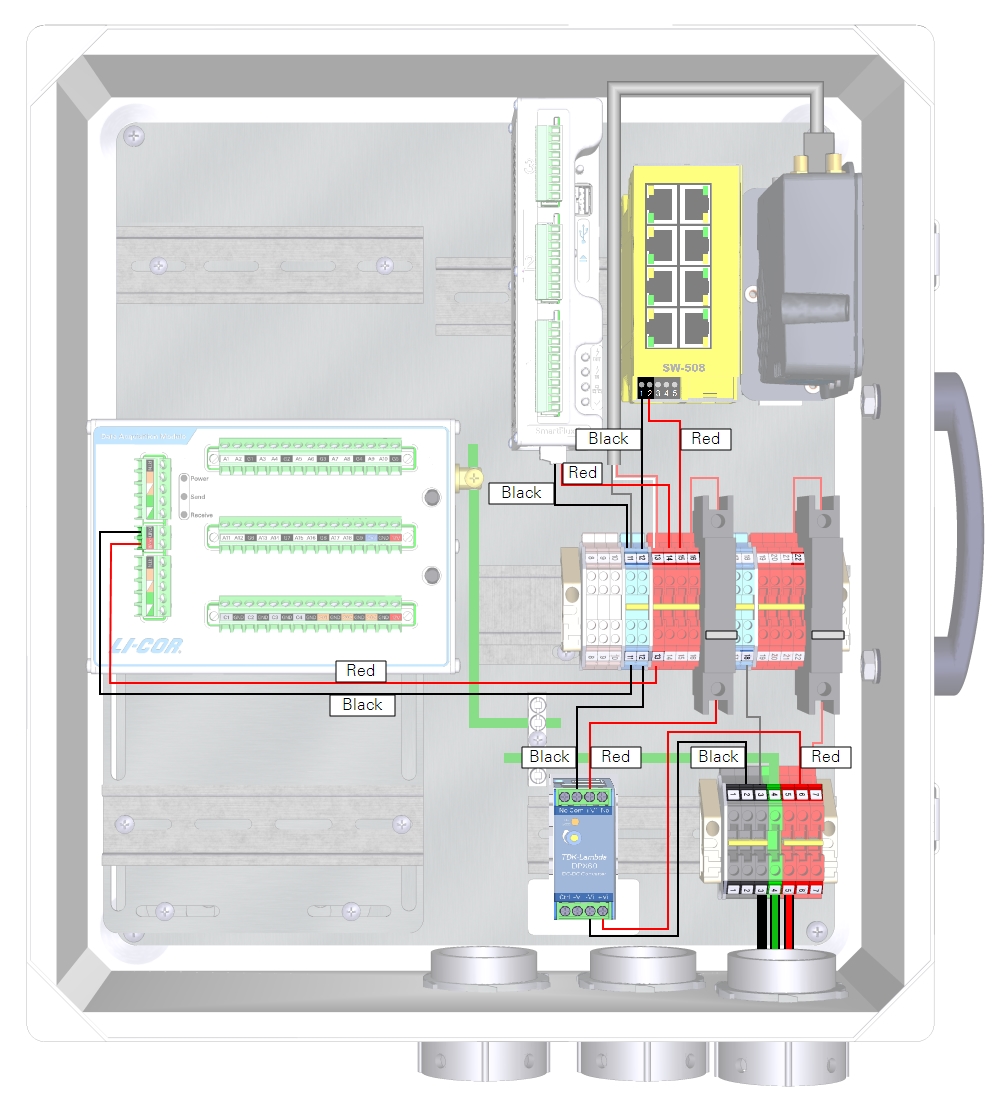
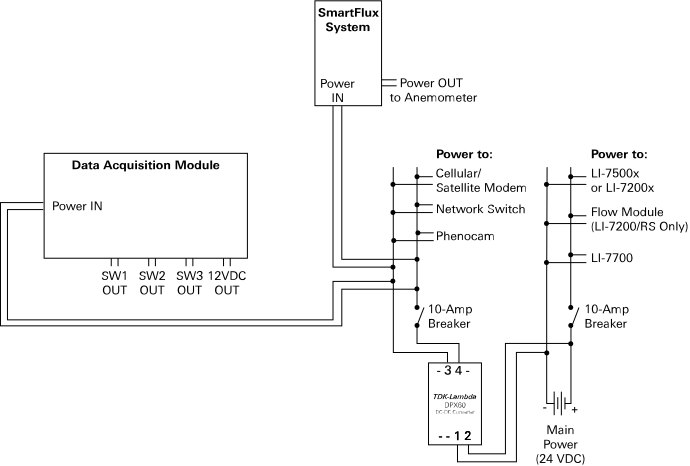
Connect the incoming power to the charge controller Input terminals (-Vi and +Vi) and connect the regulated power from the charge controller output terminals (COM and +V1) to the left breaker and DIN terminal 12. See Figure 2‑4 and Table 2‑5 for details.
Preparing the gas analyzer
Begin by installing the temperature sensor, head cable, and USB drive.
Connecting the temperature sensor
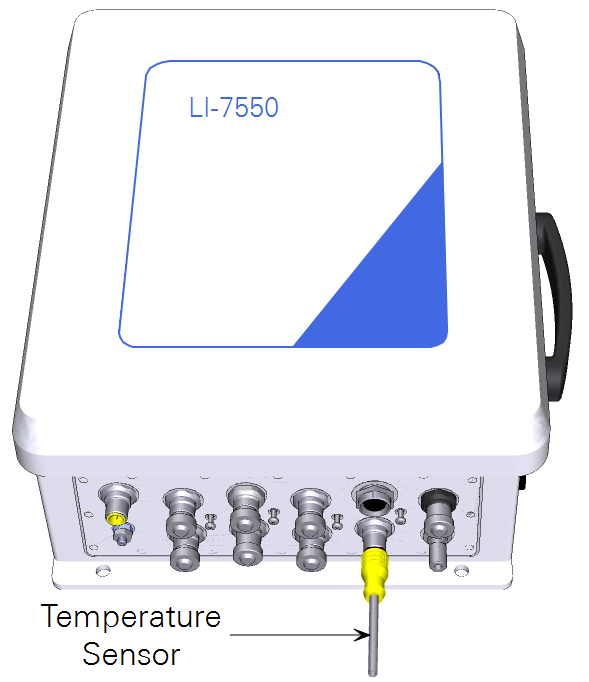
The air temperature sensor (part number 9975-026) connects to the SENSOR connector on the LI-7550 (see Figure 2‑5).
Connecting the head cable
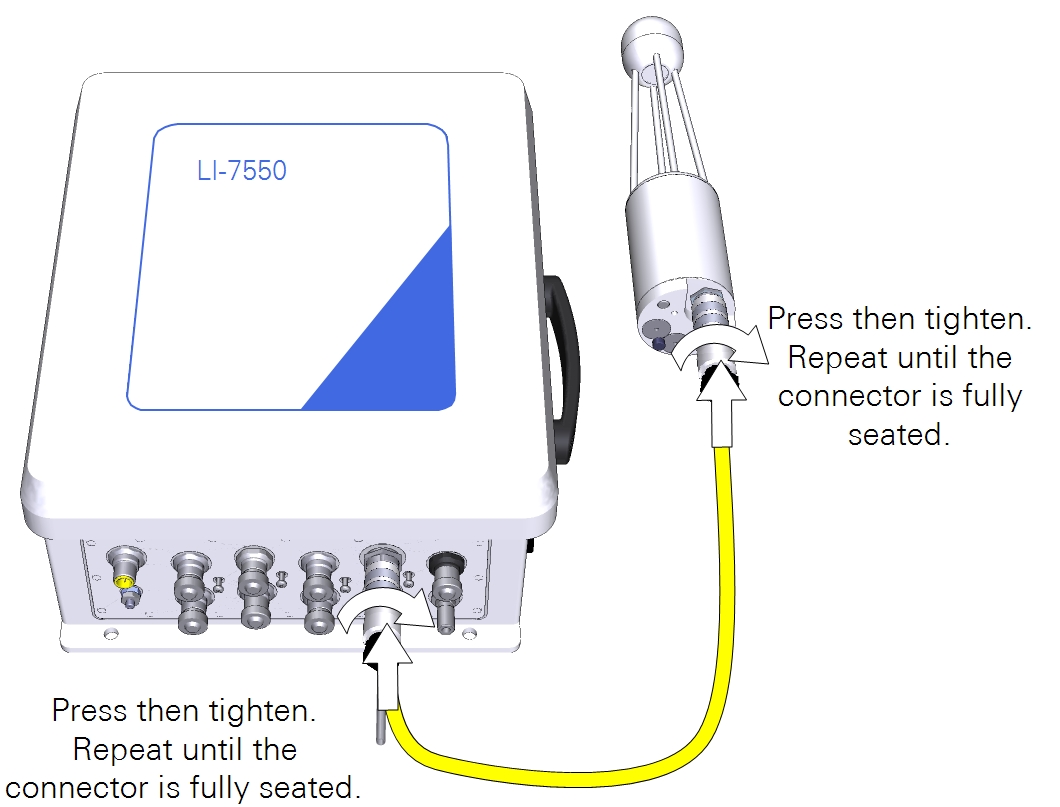
The head cable connects between the bottom of the head and the IRGA connector on the LI-7550. Align the notches on the cable connectors, then push in and turn the connector clockwise until it is tight. Continue to push in while tightening the connector until the connector is fully seated. The gasket must be compressed to ensure a watertight seal.
Installing the LI-7550 USB drive
Open the cover to the LI-7550 and insert the USB drive from the spares kit into the USB port. Close and latch the cover.
Caution: A USB drive must be installed in the LI-7550 to log data. Beginning with SmartFlux firmware v2.2.8, a USB drive must also be installed in the SmartFlux Core System to ensure successful data processing. A full dataset is stored on both USB drives.
Connecting gas analyzer power wires
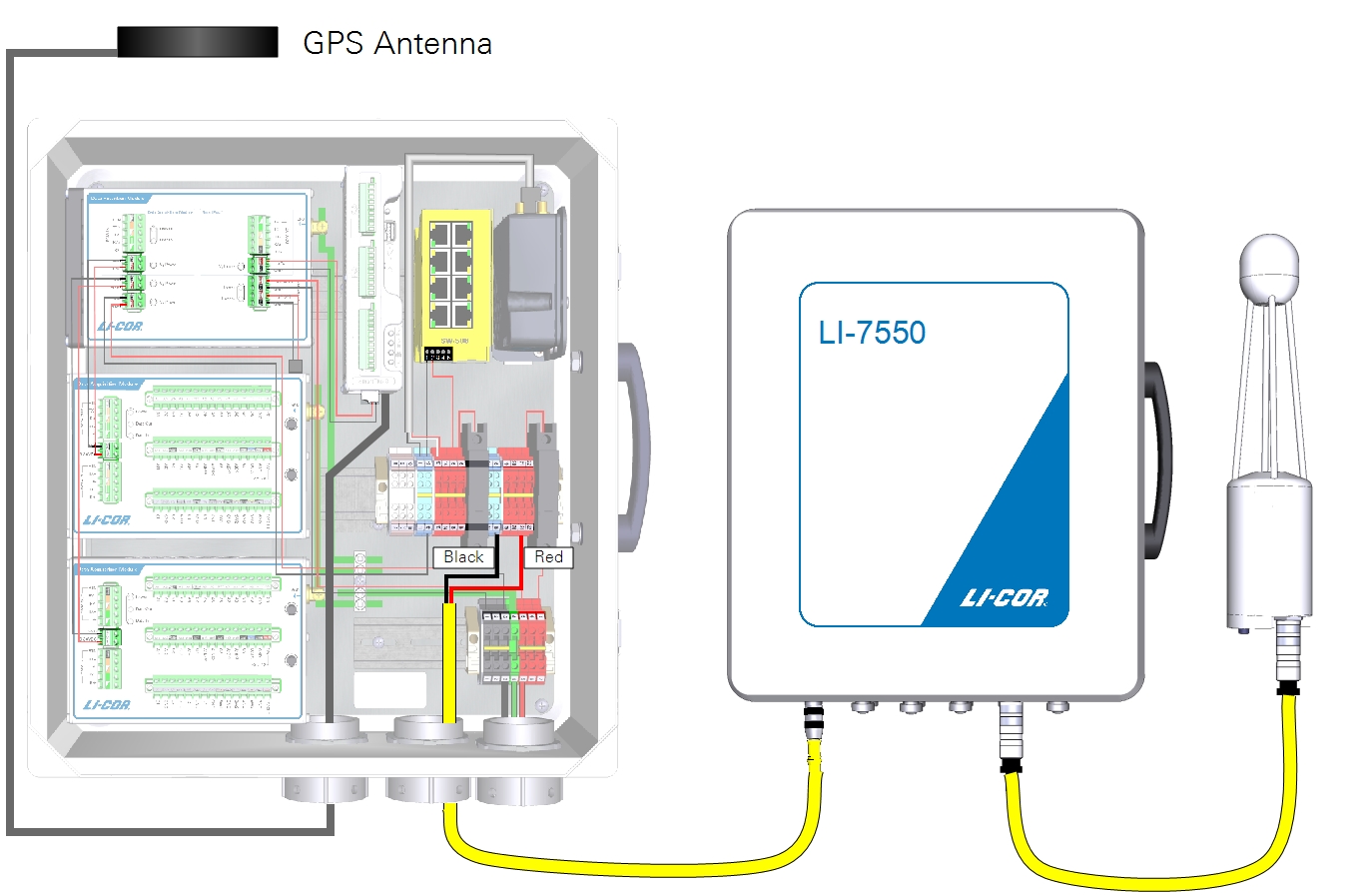
Power wires for the gas analyzer connect to terminals in the enclosure. With the eddy covariance system enclosure (7900-050) and Power Distribution Kit (7900-235), connect the red and black wire leads to corresponding red and black terminals. With the Biomet Data Acquisition System enclosure (7900-126), connect the leads as described in Table 2‑6.
| From | Wire Color | To |
|---|---|---|
| Terminal 17 (bottom) | black | LI-7550 Power (-) |
| Terminal 19 (bottom) | red | LI-7550 Power (+) |
Connecting Ethernet cables
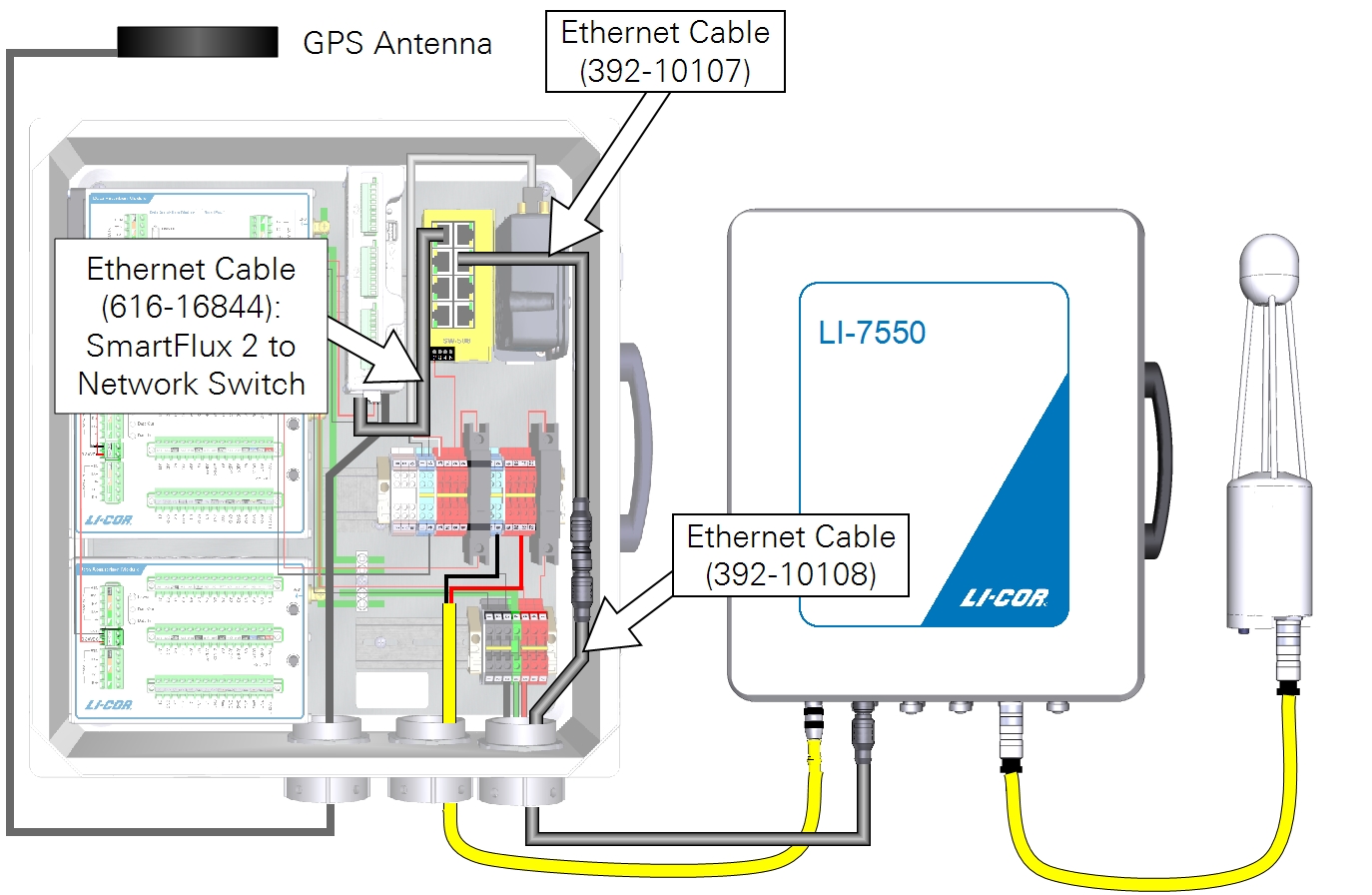
Ethernet cables connect the SmartFlux Core System and LI-7550 to the network switch. Vacant ports on the network switch are for other networked components, such as the cellular gateway, PhenoCam, LI-7700, or connecting a PC.
Connecting sonic anemometer data and power cables
The SmartFlux Core System can record digital data from a number of sonic anemometer models. These are described below. Power for the sonic anemometer is provided through the SmartFlux Core System.
Gill WindMaster or WindMaster Pro
Read more
Part Number: 7900-415-x
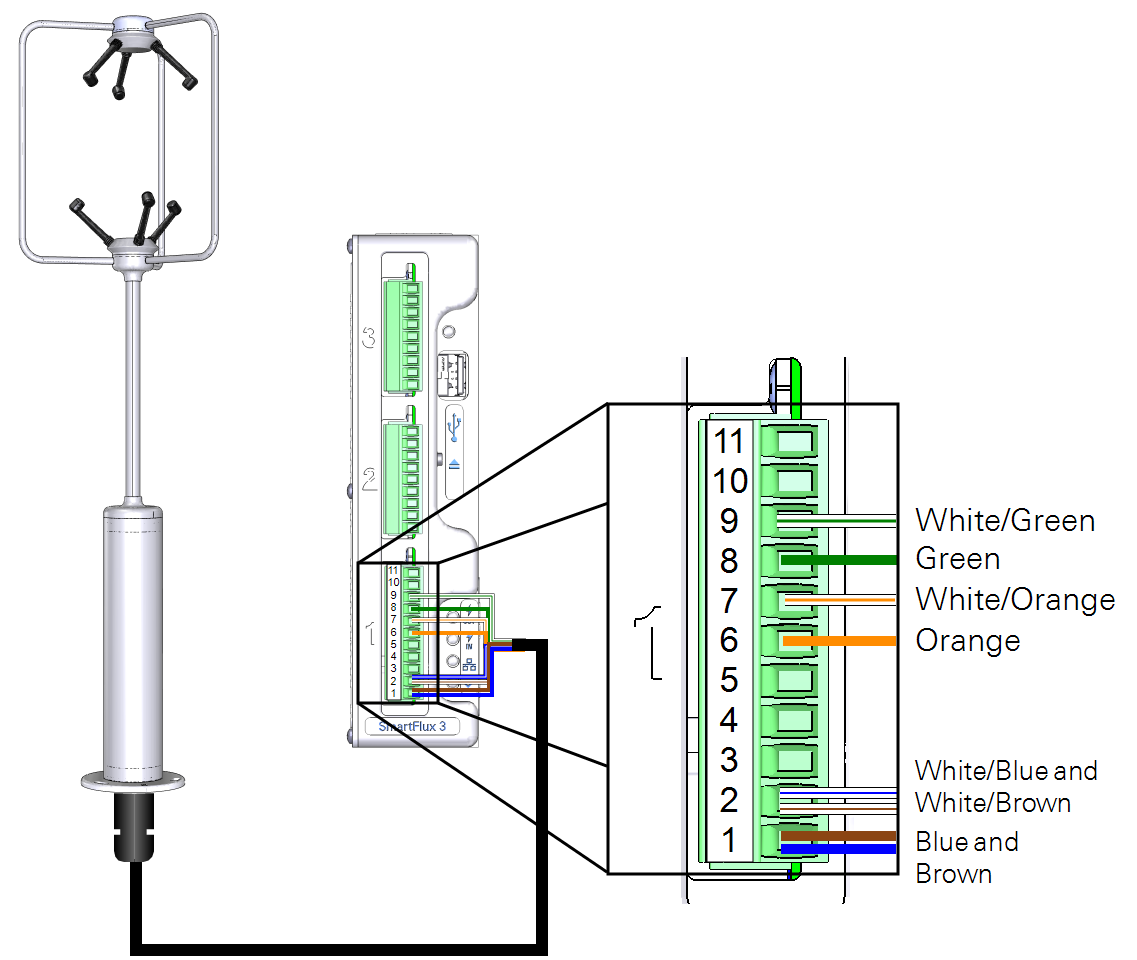
A combined power and data cable is available for the Gill WindMaster/Pro sonic anemometers. The sonic anemometer will be configured automatically when it is connected to the SmartFlux Core System and selected in the software. The cable connects to one of the digital I/O ports on the SmartFlux Core System (port 1 recommended).
| SmartFlux Terminal | SmartFlux Label | Wire Color |
|---|---|---|
| 9 | RS-422/485 RX- | White/Green |
| 8 | RS-422/485 RX+ | Green |
| 7 | RS-422/485 TX- | White/Orange |
| 6 | RS-422/485 TX+ | Orange |
| 2 | Power to Anemometer (-) | White/Blue and White/Brown |
| 1 | Power to Anemometer (+) | Blue and Brown |
Gill HS-50 or R3-50
Read more
Part Number: 7900-445-x
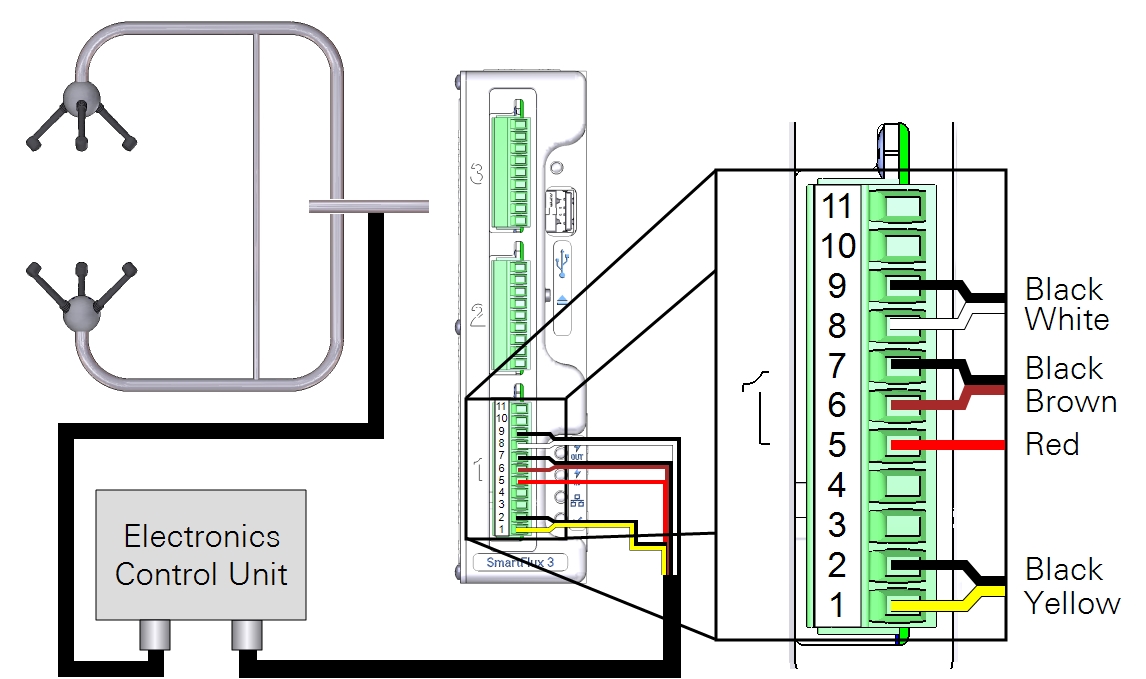
A combined power and data cable is available for the Gill HS-50 or R3-50 sonic anemometers. The sonic anemometer will be configured automatically when it is connected to the SmartFlux Core System and selected in the software. The cable connects to one of the digital I/O ports on the SmartFlux Core System (port 1 recommended). The R3 uses the same cable as the HS, but the cable connects to the base of the R3 rather than the electronics control unit.
Caution: At least 13 VDC must be supplied when using a 50 meter power cable because of voltage drops.
| SmartFlux Terminal | SmartFlux Label | Wire Color |
|---|---|---|
| 9 | RS-422/485 RX- | Black (bundled with white) |
| 8 | RS-422/485 RX+ | White |
| 7 | RS-422/485 TX- | Black (bundled with brown) |
| 6 | RS-422/485 TX+ | Brown |
| 5 | Signal Return | Red |
| 2 | Power Out (-) | Black (bundled with yellow) |
| 1 | Power Out (+) | Yellow |
Campbell Scientific CSAT3
Read more
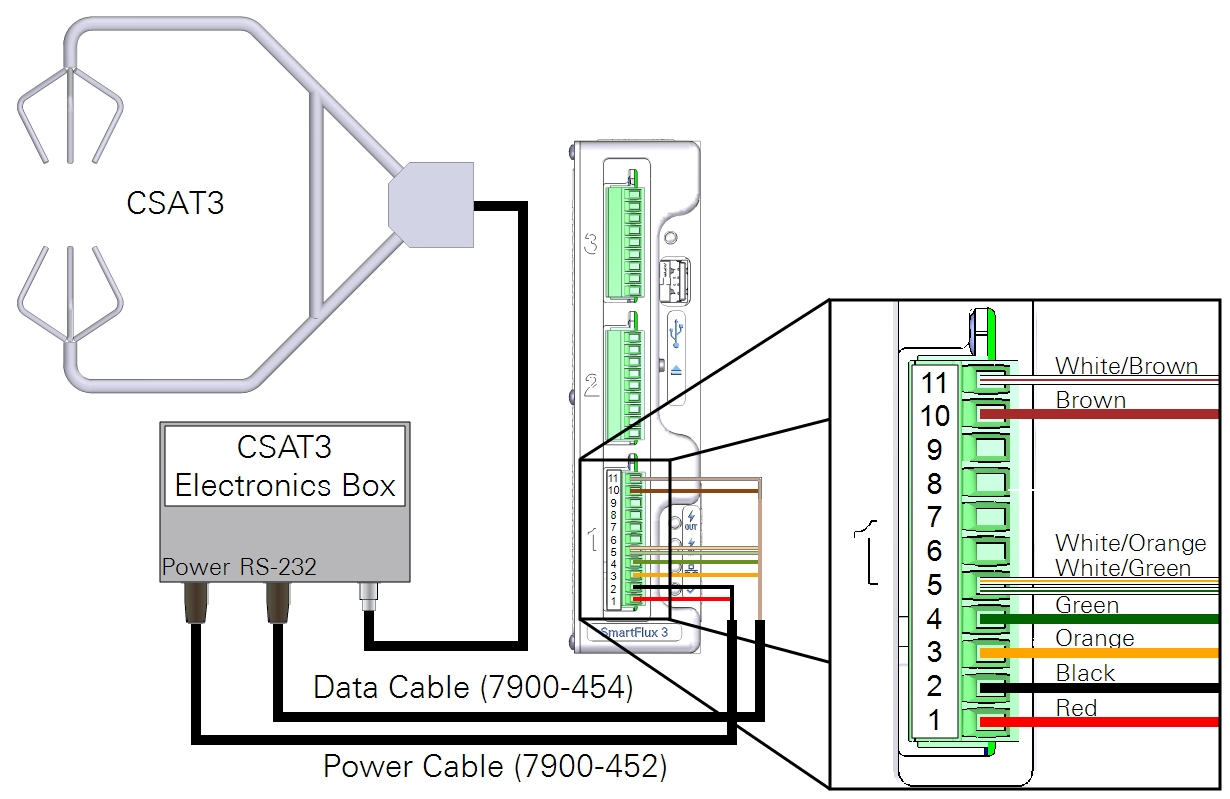
Data Cable: 7900-454-x;
Power Cable: 7900-452-x
Power and data cables are available for the Campbell Scientific, Inc. CSAT3 sonic anemometers. The sonic anemometer will be configured automatically when it is connected to the SmartFlux Core System and selected in the software. The cable connects to digital I/O Port 1 on the SmartFlux Core System.
Caution: The CSAT3 requires 10 to 16 VDC. An incoming 24 VDC to the SmartFlux Core System will damage a CSAT3 due to the power being passed through.
| SmartFlux Terminal | SmartFlux Label | Wire Color |
|---|---|---|
| 11 | CTS | White/Brown |
| 10 | RTS | Brown |
| 5 | Signal Return | White/Orange and White/Green |
| 4 | RS-232 RX | Green |
| 3 | RS-232 TX | Orange |
| 2 | Power Out (-) | Black |
| 1 | Power Out (+) | Red |
Campbell Scientific CSAT3B
See CSAT3B and CSAT3 for details on the USB connection.
Read more
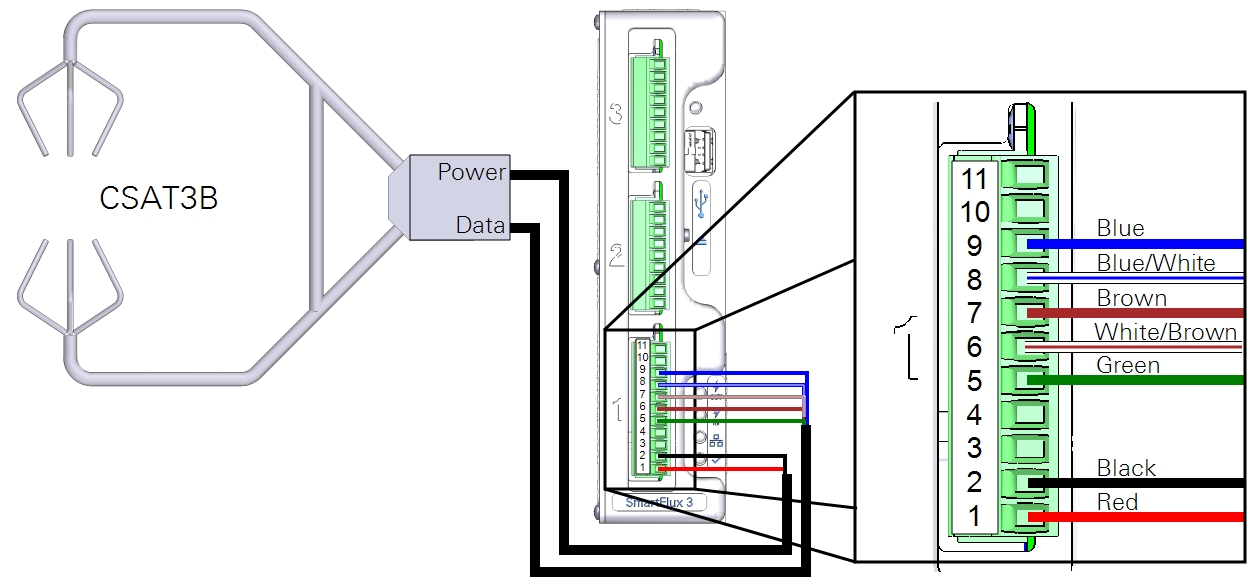
Data Cable: 7900-464-x; Power Cable: 7900-462-x
You can use a Campbell Scientific, Inc. CSAT3B sonic anemometer with the data cable (part number 7900-464-x) and power cable (part number 7900-462-x). The CSAT3B anemometer must be configured before it will work with the SmartFlux Core System. Using the Campbell Scientific Device Configuration Utility, apply the following settings.
| Parameter Name | Correct Setting |
|---|---|
| Communication Protocol | RS-485 Enabled |
| RS-485 Baud Rate | 115200 |
| Unprompted Output Port | RS-485 Port |
| Unprompted Output Rate | 50 Hz |
| Operating Mode | Unprompted Output - No Filters |
The cable connects to one of the digital I/O ports on the SmartFlux Core System (port 1 recommended).
| SmartFlux Terminal | SmartFlux Label | Wire Color |
|---|---|---|
| 9 | RS-422/485 RX- | Blue |
| 8 | RS-422/485 RX+ | Blue/White |
| 7 | RS-422/485 TX- | Brown |
| 6 | RS-422/485 TX+ | White/Brown |
| 5 | Signal Return | Green |
| 2 | Power Out (-) | Black |
| 1 | Power Out (+) | Red |
Metek Cage or Class-A
Read more
Cage Cable: 7900-482-x; Class-A Cable: 7900-492-x
A combined power and data cable is available for the Metek Multi-Path Class A and Cage sonic anemometers. The Class A has an electronic box between the head and SmartFlux; the Cage connects directly. The anemometer will be configured automatically when it is connected to the SmartFlux Core System and selected in software. The cable connects to one of the digital I/O ports on the SmartFlux Core System (port 1 recommended).
| SmartFlux Terminal | SmartFlux Label | Wire color |
|---|---|---|
| 9 | RS-422/485 RX- | Green |
| 8 | RS-422/485 RX+ | Yellow |
| 7 | RS-422/485 TX- | Brown |
| 6 | RS-422/485 TX+ | White |
| 2 | Power Out (-) | Pink |
| 1 | Power Out (+) | Gray |
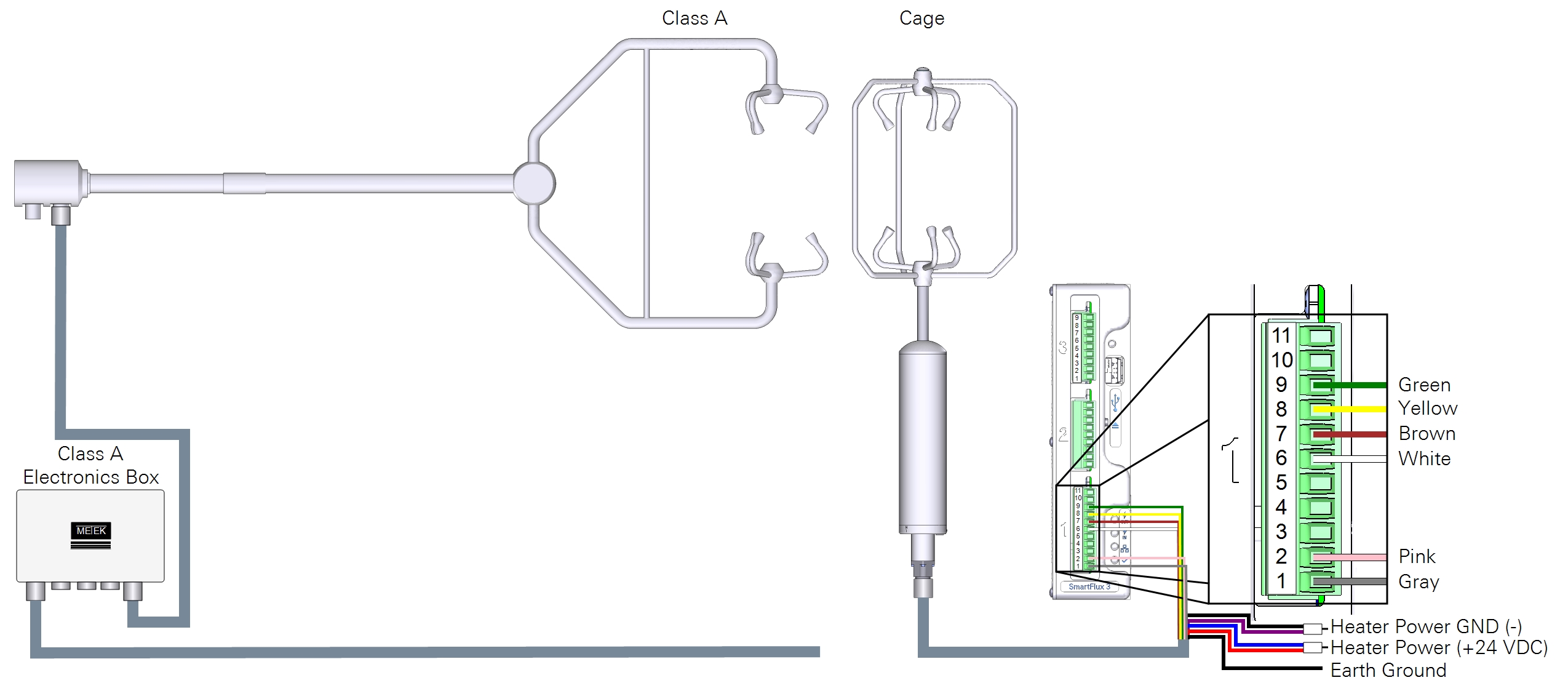
Heaters are powered by the system power supply, typically.
| Heater Wire | Color | Connects to |
|---|---|---|
| Power GND | Black | Purple | Terminals 1 to 3 |
| Power (+24 VDC) | Blue | Red | Terminals 5 to 7 |
| Ground | System ground |
Caution: Refer to the Metek MP instruction manuals for details about operating the heater in low-voltage and over-voltage conditions.
RM Young 81000x
Read more
Part Number: 7900-472-x
A combined power and data cable is available for the RM Young 81000 series sonic anemometers. The anemometer will be configured automatically when it is connected to the SmartFlux Core System and selected in software. The cable connects to one of the digital I/O ports on the SmartFlux Core System (port 1 recommended).
| SmartFlux Terminal | SmartFlux Label | RM Young Label | Wire Color |
|---|---|---|---|
| 9 | RS-422/485 RX- | B1 | White/Green |
| 8 | RS-422/485 RX+ | A1 | Green |
| 7 | RS-422/485 TX- | B2 (RX) | White/Orange |
| 6 | RS-422/485 TX+ | A2 (TX) | Orange |
| 5 | Signal Return | SREF | White/Brown |
| 2 | Power Out (-) | PWR REF | White/Blue |
| 1 | Power Out (+) | +PWR | Blue |
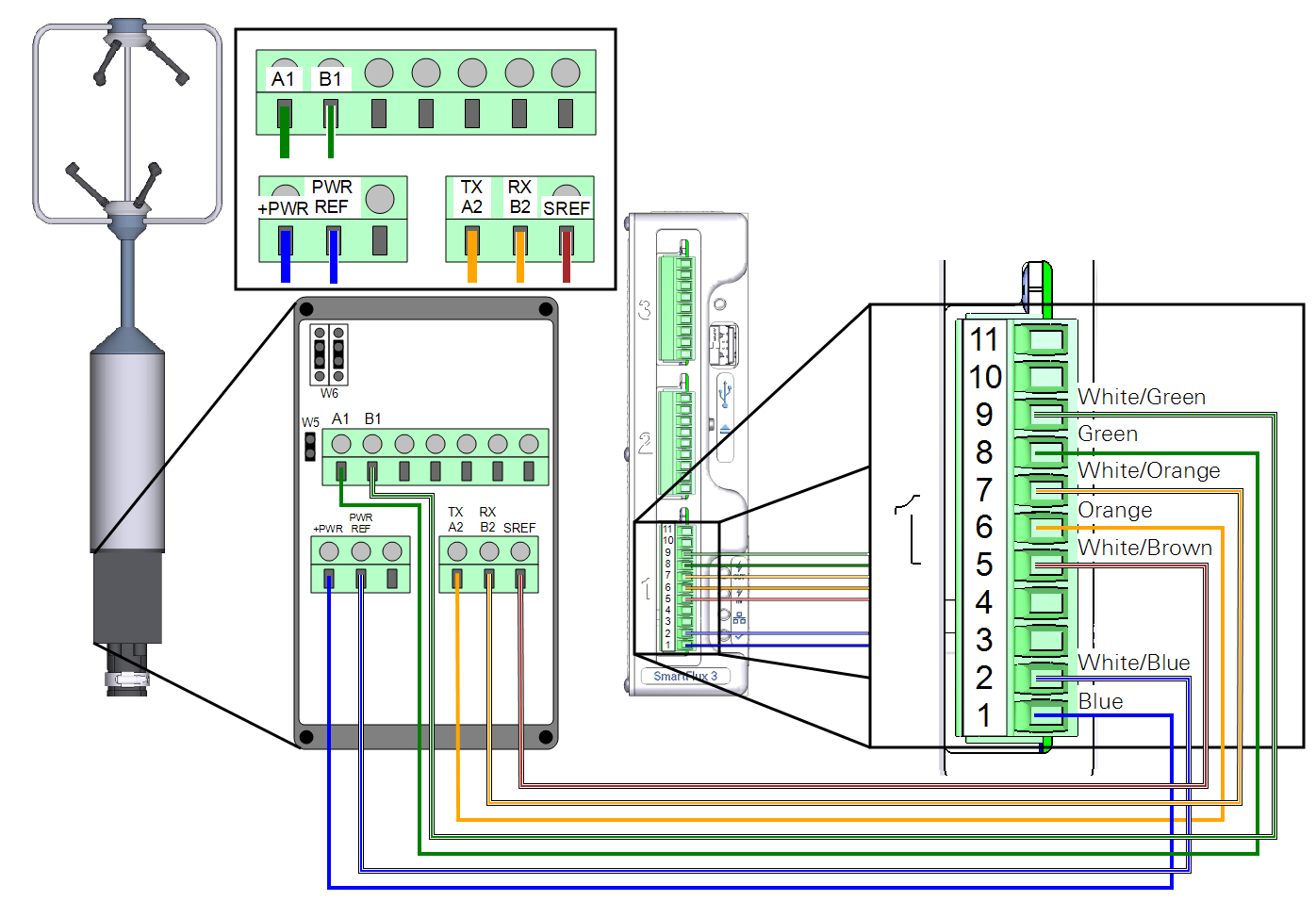
There are three shorting block jumpers in the anemometer that must be in the correct position. Two jumpers connect each pair of middle pins at W6. One jumper connects the two pins at W5.