


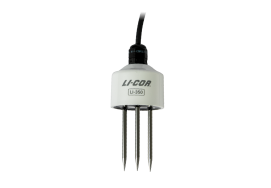
Configuring the LI-350 (SDI-12)
This section describes how to apply new settings on the LI-350 using a terminal program and SDI-12-to-USB adapter.
Connecting the LI-350 to an SDI-12 data acquisition device
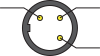
The LI-350 provides a digital output using the SDI-12 protocol. LI-350 sensors that feature the M12 connector are designed for use with some compatible LI-COR products. For these sensors, all functions are exposed in the device interface. Normally, you won't need to configure the connectorized LI-350 beyond applying some settings in the host device. Nevertheless, see Table 4‑1 for wire assignments.
LI-350 sensors that feature bare leads can be configured using a datalogger or an SDI-12-to-USB adapter.
| Color | Function | M12 Connector Pin Assignments | ||
|---|---|---|---|---|
| Black | Ground | 1: Power |
|
4: Ground |
| Red | Power (4 to 15 VDC) | |||
| White | Data | 3: Data | ||
| Bare | Connects to ground | |||
SDI-12 translator tutorial
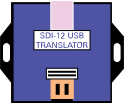
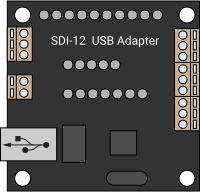
The following items are required to complete this tutorial:
-
LI-350 soil moisture sensor (SDI-12; bare leads).
-
SDI-12-to-USB Translator (e.g., vegetronix.com translator or Dr. John Liu adapter liudresllc.com).
-
Personal Computer (Windows 10/11).
-
Terminal Emulator (e.g., Tera Term).
You will connect the wires from the soil moisture sensor to the data and ground connectors on the translator. Depending on the translator, you may need to power the sensor from an external power supply (see Figure 4‑2).
Connecting to a computer with an SDI-12 translator
Connect the soil moisture sensor to the SDI-12 translator and power supply, and then connect the USB cable to your computer. The computer will establish a COM port, which may be indicated in the notifications or found in the Device Manager.
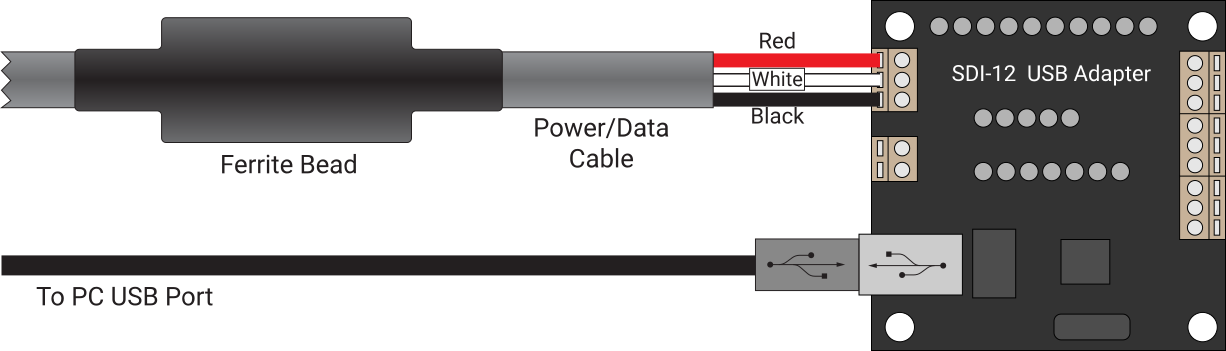
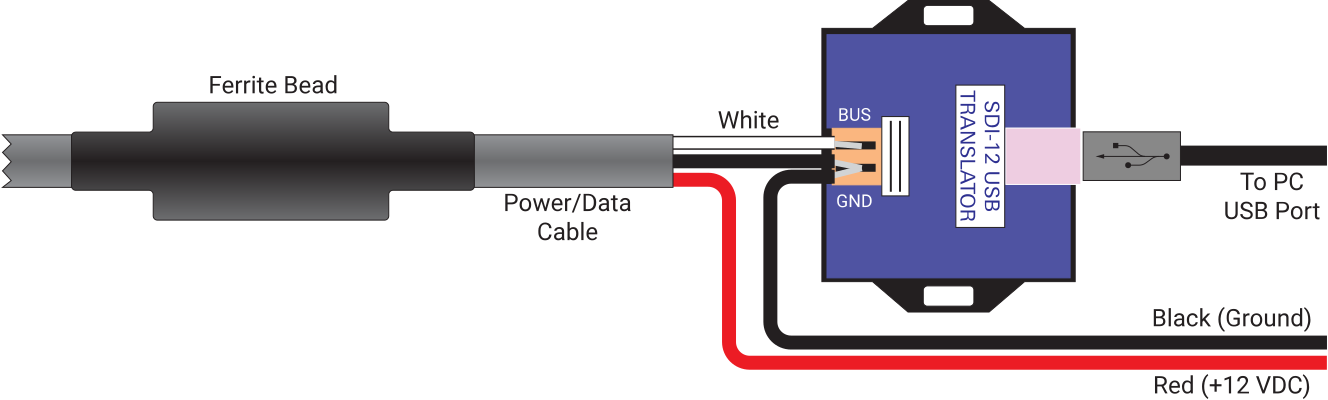
To connect to the SDI-12 translator:
-
Launch a terminal program, such as Tera Term.
-
Select Serial as the connection type, select the port for the USB translator, and then click OK.
In the default configuration, Tera Term will pass your keystrokes directly to the COM port - you will not see what you have typed. Change the setting under Setup > Terminal, and check Local Echo and your keystrokes will appear in the terminal, along with replies from the sensor. This is a matter of convenience - so you can see what you are sending to the device.
Note: The New-line Receive and Transmit settings must be CR.
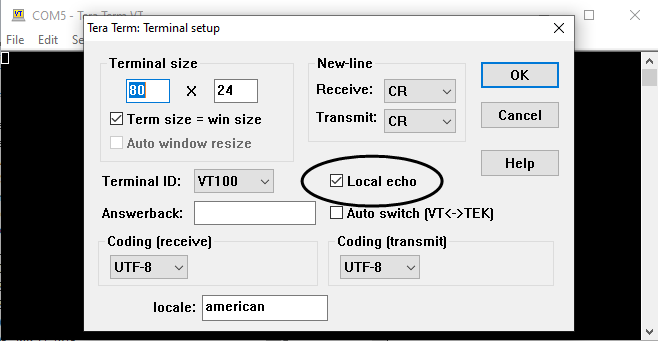
Communicating with a command-line interface
This section presents a variety of commands and replies that you can use to configure and view data from the device. This is a practical tutorial; you won't do this when the LI-350 is deployed. You will do this to observe the configuration and familiarize yourself with the data structure. Normally, communication with the probe (including data logging) will be carried out by a datalogger.
Vegetronix translator only: Use transparent mode
If using the Vegetronix translator, queries must be sent in transparent mode. This is accomplished by preceding the command with a capital T and a space. So, instead of ?!, you'll send T ?!.
Get the address
To request the address of the sensor connected to the SDI-12 bus, enter the following. Remember the T if using the Vegetronix translator.
-
Command: ?!
-
Reply: 0

The number in the reply (0 in this case) is the connected sensor's address. Replies are presented in the same line as the command.
Device information
Each probe is configured with an address of 0 by default. The first time you connect to a probe, it should be the only device attached to the SDI-12 array. After connecting initially, you can set the address and then power up the remaining SDI-12 devices.
-
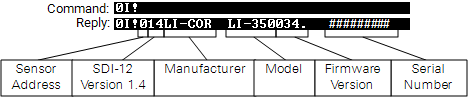
Command: 0I! (the address (0), the capital letter I for information, and an exclamation point). Remember the T if using the Vegetronix translator.
-
Reply: 014LI-COR LI-350034. ######### (identifying information for the sensor, including the device address, manufacturer, model, firmware version, and serial number)
Change the address
LI-350s can be addressed with alphanumeric characters (0 to 9, A to Z, and a to z). To change a sensor's address, the command starts with the current address followed by a capital A for address, and then the new address.
-
Command: 0A1! (the address (0), capital letter A for address, the number 1, which is the new address, and the exclamation point)
-
Reply: 1 (the new address)
Query the soil type setting
Mineral soil is the default soil setting. To see the current soil type setting, enter the following command.
-
Command: 0XST! (the address (0), the command XST, and the exclamation point !)
-
Reply: Mineral_Soil (the soil type)
Change the soil type setting
To change the soil type setting, enter the command, with the new soil type.
-
Command: 0XSTM! (the address (0), the command XST, and the exclamation point !), where M represents the new soil type (mineral, in this case).
-
Reply: Mineral_Soil (the soil type)
Soil type options are M for mineral soil, SL for soil-less media, C1 for custom 1, and C2 for custom 2. Custom soil types require custom calibration coefficients to be loaded, as described in Custom calibrations for the LI-350.
Get new data
Enter the M command to instruct the LI-350 to perform a new measurement.
-
Command: 0M! (address (0), the command M, ending with !).
-
Reply:
00003
Display the new data
Enter the following to report the new data.
-
Command: 0D0! (address (0), the command D0 for data group 0, ending with !).
-
Reply: The data (#, ####, ##.##, #) Sensor Address, Calibrated Counts (Moisture; signed 32-bit integer), Soil Temperature (°C), Electrical Conductivity (µS/cm).
To read the latest data, do both Get new data and Display the new data.
Basic SDI-12 commands
With the letter a as a proxy for sensor address, you can send the following commands to the LI-350. Remember the T if using the Vegetronix translator. Refer to the documentation for your adapter for more details.
Sensor information commands
| Command | Description | Expected Response |
|---|---|---|
aI!
|
Identify sensor | LI-COR LI-350 + SW_Version.Serial_Number |
aXST!
|
Query soil type | Returns current soil type - String |
aXST<char>!
|
Set soil typeM - Mineral_SoilSL - Soilless_MediaC1 - Custom1C2 - Custom2 |
Returns soil type stored in memory after update - String |
Report data commands
| Command | Description | Expected Response |
|---|---|---|
aM!
|
Retrieve new data | a0003 |
aD0!
|
Report the data | Address <ASCII> Soil Moisture - Calibrated Counts <int32> Temperature - °C <float> EC - µS cm−1 (temperature corrected) <int32> |
aM1!
|
Retrieve new data (group 1) | a0005 |
aD0!
|
Report the data | Address <ASCII> VWC - m3 m−3 <float> EC - µS cm−1 (temperature corrected) <int32> Temperature - °C <float> Temperature - °F <float> EC - µS cm−1 (no temperature correction) <int32> |
aM2!
|
Retrieve new data (group 2) | a0009 |
aD0!
|
Report the data | Address <ASCII> VWC - m3 m−3 <float> Temperature - °C <float> EC - µS cm−1 (temperature corrected) <int32> Raw Counts <int32> |
aD1!
|
Report the data | Address <ASCII> Calibrated Counts <int32> Soil Moisture Zero <int32> Soil Moisture Span <float> EC - µS cm−1 (no temperature correction) <int32> EC Span <float> |
aM3!
|
Retrieve new data (group 3) | a0006 |
aD0!
|
Report the data | Address <ASCII> VWC - m3 m−3 - Mineral Soil <float> VWC - m3 m−3 - Soil-less Media <float> Temperature - °C <float> EC - µS cm−1 (temperature corrected) <int32> Dielectric Permittivity - unitless <float> Calibrated Counts <int32> |
Extended SDI-12 commands
Additional commands allow you to adjust the calibration of the sensor. These should be used with caution, as some of these commands will adjust the sensor response.
Endmember calibration commands
| Command | Description | Expected Response |
|---|---|---|
aXMA!
|
Perform an air calibration | ACK (NOTE: this changes the sensor response!) |
aXMW!
|
Perform a water calibration | ACK (NOTE: this changes the sensor response!) |
aXSA!
|
Query air calibration value | Current air calibration value - Int |
aXSA<(int)>!
|
Set air calibration value | Air calibration stored in memory after update - Int |
aXSW!
|
Query water calibration value | Current water calibration value - Int |
aXSW<(int)>!
|
Set water calibration value | Water calibration stored in memory after update - Int |
Electrical conductivity correction commands
| Command | Description | Expected Response |
|---|---|---|
aXCA!
|
Query A electrical conductivity correction | Current A factor for correction SMS += A × (EC)2 |
aXCA<(float)>!
|
Set A electrical conductivity correction | Value stored in memory after update - Float |
aXCB!
|
Query B electrical conductivity correction | Current B factor for correction SMS += B × (EC) |
aXCB<(float)>!
|
Set B electrical conductivity correction | Value stored in memory after update - Float |
Electrical conductivity commands
| Command | Description | Expected Response |
|---|---|---|
aXEA!
|
Query coefficient of electrical conductivity EC3 factor | Current electrical conductivity A factor - Float |
aXEA<(float)>!
|
Set coefficient of electrical conductivity EC3 squared factor | Electrical conductivity A factor stored in memory after update - Float |
aXEB!
|
Query coefficient of electrical conductivity EC2 factor | Current electrical conductivity B factor - Float |
aXEB<(float)>!
|
Set coefficient of electrical conductivity EC2 factor | Electrical conductivity B stored in memory after update - Float |
aXEC!
|
Query coefficient of electrical conductivity EC1 factor | Current electrical conductivity C factor - Float |
aXEC<(float)>!
|
Set coefficient of electrical conductivity EC1 factor | Electrical conductivity C stored in memory after update - Float |
aXES!
|
Query electrical conductivity span | Current value of electrical conductivity span - Scientific Notation |
aXES<float>!
|
Set electrical conductivity span | Electrical conductivity span stored in memory after update - Scientific Notation |
aXEK!
|
Query electrical conductivity span | Current value of electrical conductivity span - Scientific Notation |
aXEK<float>!
|
Known electrical conductivity, Calculate span; Calculates the EC span using a user-provided EC value at 25 °C. Value is normalized using measured temperature |
Electrical conductivity span stored in memory after update - Scientific Notation |
Volumetric water content commands
| Command | Description | Expected Response |
|---|---|---|
aXVA!
|
Query coefficient of soil a4 factor | Current volumetric water content a4 factor - Float |
aXVA<(float)>!
|
Set coefficient of soil a4 factor | Volumetric water content a4 stored in memory after update - Float |
aXVB!
|
Query coefficient of soil a3 factor | Current volumetric water content a3 factor - Float |
aXVB<(float)>!
|
Set coefficient of soil a3 factor | Volumetric water content a3 stored in memory after update - float |
aXVC!
|
Query coefficient of soil a2 factor | Current volumetric water content a2 factor - Float |
aXVC<(float)>!
|
Set coefficient of soil a2 factor | Volumetric water content a2 stored in memory after update - Float |
aXVD!
|
Query coefficient of soil a1 factor | Current volumetric water content a1 factor - Float |
aXVD<(float)>!
|
Set coefficient of soil a1 factor | Volumetric water content a1 stored in memory after update - Float |
aXVE!
|
Query coefficient of soil offset | Current volumetric water content offset - Float |
aXVE<(float)>!
|
Set coefficient of soil offset | Volumetric water content offset stored in memory after update - Float |
Dielectric permittivity commands
| Command | Description | Expected Response |
|---|---|---|
aXDA!
|
Query coefficient of dielectric permittivity E3 factor | Current value of coefficient - Scientific Notation |
aXDA<float>!
|
Set coefficient of dielectric permittivity E3 factor | Set coefficient value stored in memory - Scientific Notation |
aXDB!
|
Query coefficient of dielectric permittivity E2 factor | Current value of coefficient - Scientific Notation |
aXDB<float>!
|
Set coefficient of dielectric permittivity E2 factor | Set coefficient value stored in memory - Scientific Notation |
aXDC!
|
Query coefficient of dielectric permittivity E1 factor | Current value of coefficient - Scientific Notation |
aXDC<float>!
|
Set coefficient of dielectric permittivity E1 factor | Set coefficient value stored in memory - Scientific Notation |
aXDD!
|
Query coefficient of dielectric permittivity E0 factor | Current value of coefficient - Scientific Notation |
aXDD<float>!
|
Set coefficient of dielectric permittivity E0 factor | Set coefficient value stored in memory - Scientific Notation |
Note: Coefficients have a resolution of eight digits. V commands can only be edited if the device is configured for Custom 1 (C1) or Custom 2 (C2) soil types.
Responses may include the following error codes.
| Code | Reply | Description |
|---|---|---|
| 00 | - | No error |
| 01 | UNKNOWN_CMD | Unknown command |
| 02 | INVALID_INPUT | Invalid input |
| 03 | EEPROM_WRITE_FAIL | Write failure |
| 04 | INPUT_OUTSIDE_BOUNDS | Value is outside allowed bounds |
| CANNOT_OVERRIDE_PRESETS | Some presets cannot be changed | |
| 99 | UNKNOWN_ERROR | Unknown error |
The SDI-12 implementation follows the specifications at https://www.sdi-12.org/current_specification/SDI-12_version-1_4-Jan-30-2021.pdf.