


Suggested warmup procedure
Here are some suggested steps to perform while waiting for the LI-6800 to warm up. The TGA, which takes much longer to warm up and stabilize, should already have been on for 10+ hours in sleep mode.
Since some of the warmup tests for the LI-6800 do very non-standard things to the sample cell exhaust flow, the tests may trigger momentary diagnostic codes on the TGA, causing a red status condition. This does no harm, but if you want to avoid this, consider disconnecting the tubing between the interface and the TGA, or even switching the TGA to a tank port—especially an empty one. (If no tank is connected, the TGA will simply be drawing ambient air.)
-
When checking chemicals on the LI-6800 console, also check the silica gel in the TGA interface box scrub column.
If tanks are connected to the box, verify tanks are open and outlet pressure set to < 5 PSI.
-
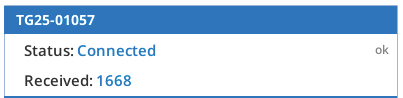
Start TGA communications in the TGA > Status screen by entering the TGA serial number or IP address (both available on the TGA screen) and tap Start.
TGA Comms should indicate Connected and begin a counter with Received packets that updates at 1 Hz.
-
Just prior to running the LI-6800 warm-up tests is a good time to start the interface box pump, to establish low H2O reaching the TGA.
If you protocol requires calibration of the TGA (zero and span checks), this is a good time to do it.
To start scrubbing H2O, go to the TGA Source & Cal screen, and check the Drier pump speed box. The recommended pump speed is 3V, which sets a reasonably high flow rate in the scrub flow path. Once enabled, this can take 20 to 30 minutes to reach equilibrium. In cool conditions, it will take less time; in warm conditions, it will take more time. The goal is to get the H2O down to < 5 mmol mol-1 and H2O trend under 1 mmol mol-1 hr-1: these can be monitored on the Status page.
-
For the LI-7825/LI-8825, once a stable TGA H2O value is reached, measure the isotopic calibration (Isotopic calibrations).