


Frequently asked questions
The questions address LI-COR eddy covariance systems that consist of the LI-7500A/RS, LI-7200/RS, and LI-7500DS.
All of the SmartFlux Systems run EddyPro to compute results on site. The differences are given below.
SmartFlux Core System:
- The newest model of SmartFlux System. It replaces the SmartFlux 2 and SmartFlux 3 Systems. SmartFlux 2 and SmartFlux 3 Systems can be upgraded to SmartFlux Core System with a firmware update.
- For use with the LI-7500DS, LI-7500A/RS, and LI-7200/RS.
- Installs inside an enclosure. GPS antenna installs outside the enclosure.
- Reads digital data and diagnostics from the sonic anemometer.
- The SmartFlux Core operating instructions are included with the LI-7500RS, LI-7200RS, and LI-7500DS documentation.
SmartFlux 2 System:
- For use with the LI-7500A/RS or LI-7200/RS.
- Installs inside an enclosure. GPS antenna installs outside the enclosure.
- Reads digital data and diagnostics from the sonic anemometer.
- Can be upgraded to the SmartFlux Core System with a firmware update.
SmartFlux 3 System:
- For use with the LI-7500DS.
- Installs inside an enclosure. GPS antenna installs outside the enclosure.
- Reads digital data and diagnostics from the sonic anemometer.
- Can be upgraded to the SmartFlux Core System with a firmware update.
Original SMARTFlux System:
- For use with the LI-7500A/RS or LI-7200/RS.
- Installs inside the LI-7550 case.
- Reads analog data from the sonic anemometer.
- The original SMARTFlux operating instructions are available here.
The ideal workflow depends on the equipment you have, where it is located, and your data needs. If your system is installed at a site, follow these steps:
Updating software and firmware
-
While you have dependable internet access, download both the SmartFlux Core System updater and win-GHG application to a laptop computer.
SmartFlux Core Update
To upgrade to the SmartFlux Core System, get the SmartFlux Core System Updater v4.2.1 and win-GHG Interface Software v9.0.0. Any SmartFlux 2 or 3 System can be upgraded to the SmartFlux Core System with the v4.2.1 firmware and corresponding win-GHG v9.0.0 interface software. Both applications are available from the link below.
-
Install both applications on the computer that you will bring to the field site.
You'll use this computer to update the SmartFlux Core System and configure the system using the win-GHG interface application.
-
At the site, connect the computer with the system with a network cable and then connect with the system using the win-GHG interface application.
-
Stop data logging (click the Stop button).
-
Update the SmartFlux System to version 9.0.0 (see Updating to the SmartFlux Core System).
Connecting the system to LI-COR Cloud
While your computer is connected to the system, follow these steps.
-
In the win-GHG application, go to SmartFlux > LI-COR Cloud/Flux Suite.
-
If you are configuring a new system, it should already be provisioned and display a device key.
-
If you do not see the device key, click the Provision SmartFlux button (internet access required). Wait a moment for the interface to get and present the key.
-
-
Click the button to Copy Device Key to Clipboard.
Save the key as text on your computer and record the serial number of the SmartFlux Core System. The serial number is printed on the label. Later, you'll enter the device key and serial number to register the device on LI-COR Cloud.
-
In a location where your computer has internet access, log into LI-COR Cloud (www.licor.cloud); create a new account if needed.
-
Under Devices, click Register Device.
-
Follow the steps at Registering LI-COR eddy covariance Systems.
-
Verify the settings in the win-GHG software and check to be sure that data logging has restarted.
Click Start if needed.
Now, the system is registered and will begin uploading new data as it becomes available.
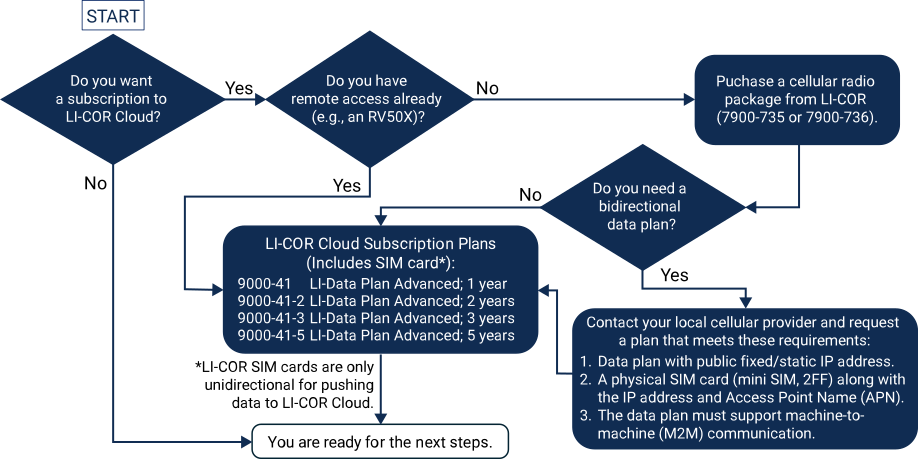
The workflow and steps depend on the equipment you already have and your data needs. Refer to this schematic to find the workflow that satisfies your needs.
-
If you have an eddy covariance system and RV50X cellular modem already, contact your sales representative and request a LI-COR Cloud subscription (see Subscription options).
-
If you have an eddy covariance system but do not have a cellular radio, get either 7900-735 or 7900-736 (APAC) and determine if you need a unidirectional or bidirectional data plan.
-
If you need a unidirectional data plan it is included with the subscription (see Subscription options).
-
If you need a bidirectional data plan, purchase a bidirectional data plan from a local provider with the requirements given in Bidirectional data plan requirements.
-
Bidirectional data plan requirements
A bidirectional data plan is only needed if both upload and download are required.
-
Data plan with a public fixed/static IP address.
-
A physical SIM card (mini SIM, 2FF) along with the IP Address and Access Point Name (APN).
-
The data plans must support machine-to-machine (M2M) communication.
-
Then, arrange a subscription to LI-COR Cloud (see Subscription options).
Subscription options
The subscription includes a SIM card and unidirectional data transfer for the following terms:
-
9000-41 LI-Data Plan Advanced (1 year)
-
9000-41-2 LI-Data Plan Advanced (2 years)
-
9000-41-3 LI--Data Plan Advanced (3 years)
-
9000-415 LI-Data Plan Advanced (5 years)
See licor.com/products/li-cor-cloud/plan-comparison to order a data plan.
No. The instrument system will continue to log data to its local storage and function as it has in the past.
No, you do not need to purchase a separate data plan. Your subscription to LI-COR Cloud includes cellular data service. LI-COR Cloud data plans are unidirectional, meaning that the device can upload data to the cloud.
However, if you need to send data to your device as well as upload data from the device to LI-COR Cloud, purchase a bidirectional data plan from a local provider with the requirements given in Bidirectional data plan requirements.
Yes. For the SmartFlux Core System, install the GPS receiver outside of an enclosure. It is weather resistant and should tolerate outdoor conditions. Never install the receiver in a metal enclosure because metal will block radio signals from the GPS satellites. The original SmartFlux System GPS receiver was designed to be installed inside the LI-7550 box. The SmartFlux Core System GPS receiver, however, should be installed with a clear view of open sky. If the GPS antenna is unable to receive satellite signals, the unit will be unable to set the time and there may be issues with time synchronization as a result.
Always set PTP to Automatic for all components in the system, including the LI-7500A/RS/DS, LI-7200/RS, and LI-7700. This instructs the system to use the best clock available, which will be the GPS clock in a satellite. If you choose another setting, the instruments may be unable to synchronize their clocks, and the data may be more difficult to align.
We have examined many different USB adapters and found the type that we sell to work best with all of our instruments. Other adapters may work, but they may not.
We can only guarantee the FTDI adapter that we sell. It is included with many of the LI-COR instruments that require serial communication with a computer. We have found that some third-party USB adapters (Prolific, for example) do not accurately transmit all the data from the instrument to the computer, or vice versa. You should use an adapter with an FTDI chipset, and Belkin and Keyspan adapters typically work well with our instruments too.