


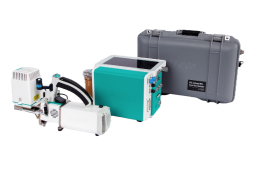
Background program tools for TGA
Much of the interface for TGA support is available to Background Programs (BPs), allowing you to combine tank measurements, re-doing isotopic cals, etc. into your data collection BPs. This section provides details on how to do this, beginning with an examples section.
The supporting details for what you see in the examples follow in subsequent sections, describing how to access or track TGA related variables, how to change TGA related settings or constants, some built-in subroutines for doing common actions (such as waiting for the TGA to stabilize), and finally some calibration related function calls that are available.
Examples
There are four example BP programs found in licor/home/apps/examples/tga that illustrate how to trigger common calibration related actions from a BP. These little programs are designed for illustrative purposes. They contain no setup dialogs, but just run as directed. Therefore, for best results, load them first into the BP editor instead of simply running then. This allows you to edit inputs as needed (e.g., which tank is turned on), and to watch progress and output as they run. Once you understand what’s going on, you can add the appropriate function calls to your own data collection BPs.
Capturing a Tank Measurement
tga_TM_example.py is a four line BP (Figure 12‑61) that turns on the tank specified, waits for TGA stability, captures the TM file, and turns off the tank. The first three actions are accomplished by a CALL to the built-in DEFINE TGA_MeasureTank, and turning the tank off is done by a SETCONTROL command TGA:Source.
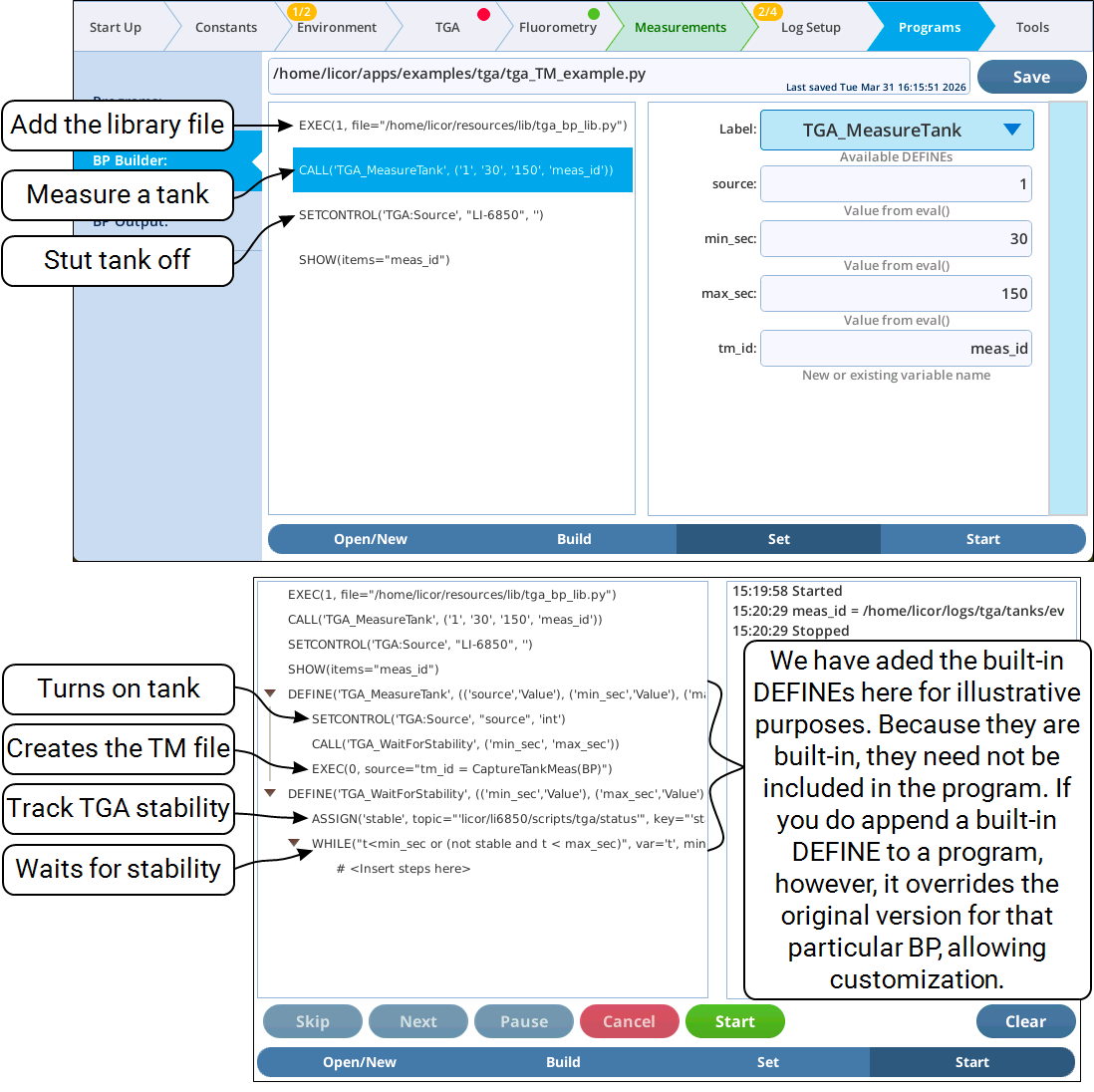
Appending a DEFINE used by the BP, as we have done in the bottom part of Figure 12‑62 also lets you monitor progress through them. Otherwise, the progress indicator simply sits on the CALL statement while the DEFINE is executing.
Applying a Tank Measurement
The program tga_cal_example.py builds on the previous example by the applying the TM file to the TGA to adjust its calibration, and adding an optional post-cal TM event (Figure 12‑62), should you wish to document the change in TGA accuracy resulting from the calibration.
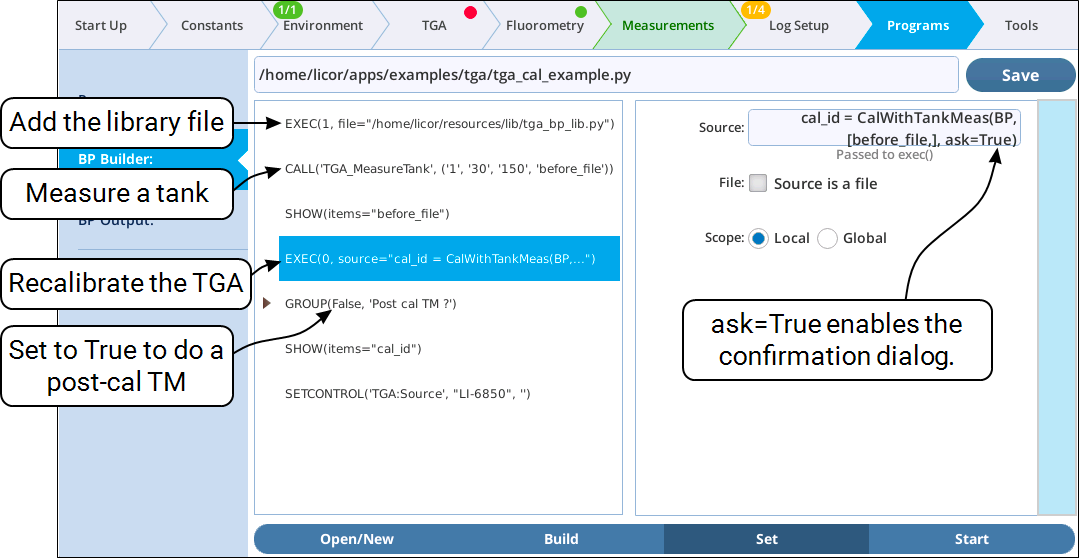
The actual calibration action is done by an EXEC command the makes a call to the library method CalWithTankMeas.
Note that this example program sets the ask parameter to True in the call to CalWithTankMeas. (Examples of this dialog, entitled “Implement Tank Cal Results”, are shown in Figure 36 on page 45 and Figure 37 on page 46). This dialog is especially important in our example program, because it protects against unintentional calibration: It is specifying port 1 regardless of whether what, if anything is connected. In practice, if you really do want to automate a calibration while no one is in attendance, you would want to set ask=False in your call to CalWithTankMeas from your BP, otherwise the program will wait for a response until someone shows up to press the button.
Doing a Zero Cal
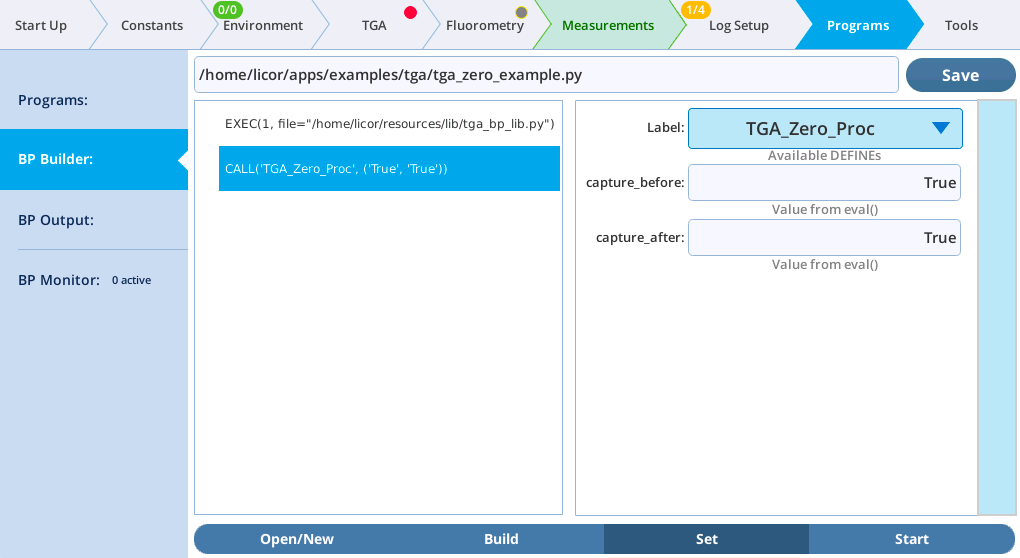
Zeroing a TGA involves turning on the appropriate tank, and triggering the TGA’s 5 minute self zeroing process. The program tga_zero_example.py (Figure 12‑63) is very short, simply making a CALL to the built-in DEFINE (TGA_Zero_Proc) that handles the entire process:
-
Turns on the zero tank. If none is connected, the DEFINE returns without doing anything.
-
If a pre-zero TM is requested, it waits for stability and creates a TM file.
-
Triggers the 5 minute TGA self-zeroing process, and waits for the TGA to report that it is finished.
-
If a post-zero TM is requested, it waits for stability, and capturing that TM file.
-
Turns off the zero tank.
Note that TGA zeroing does not require any TM, unlike the span-related calibrations in the previous example.
Launching an Isotopic Cal
The program tga_auto_isocal_example.py (Figure 12‑64) shows how to launch an isotopic cal (for LI-7825 TGAs) from a BP, and illustrates the use of the built-in DEFINE TGA_Isotopic_Cal.
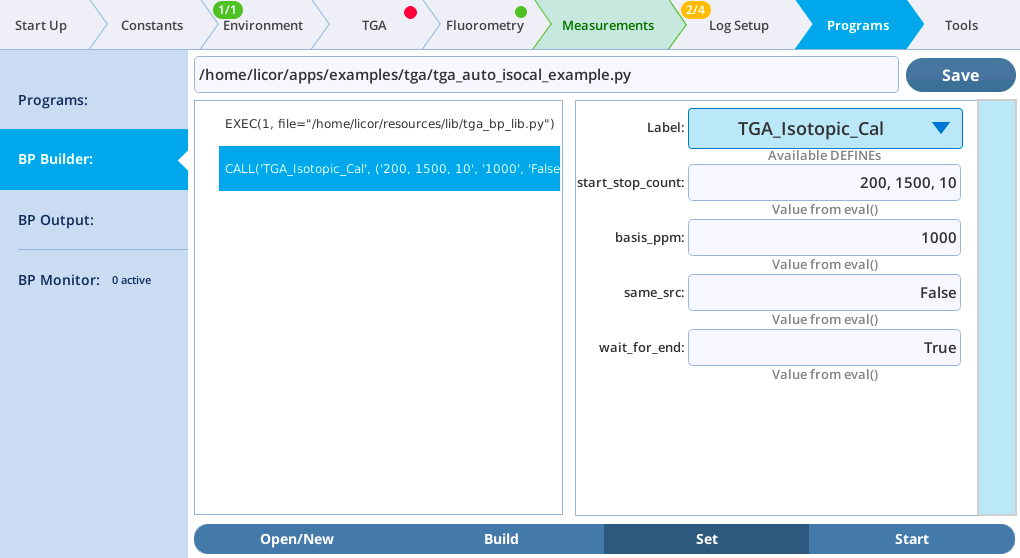
The CALL to TGA_Isotopic_Cal takes four parameters, the first three corresponding the what is prompted for in the opening dialog when the isotopic cal is run manually from the keyboard (Figure 39 on page 48).
-
start_stop_count- This entry should be three values delimited be commas: the starting CO2 concentration (ppm), the ending CO2 concentration (ppm), and the number of points to be measured over that range. -
basis_ppm- Where the TGA was last calibrated. Note: if you enter -1 for this value, the program will look up and use the basis value entered the last time the isotopic cal was run manually. -
same_src- Usually False, unless the CO2 source has not changed since the previous isotopic cal. -
wait_for_end- True if you wish for the CALL to not return until the isotopic cal is finished.
Tracking TGA variables
Data dictionary
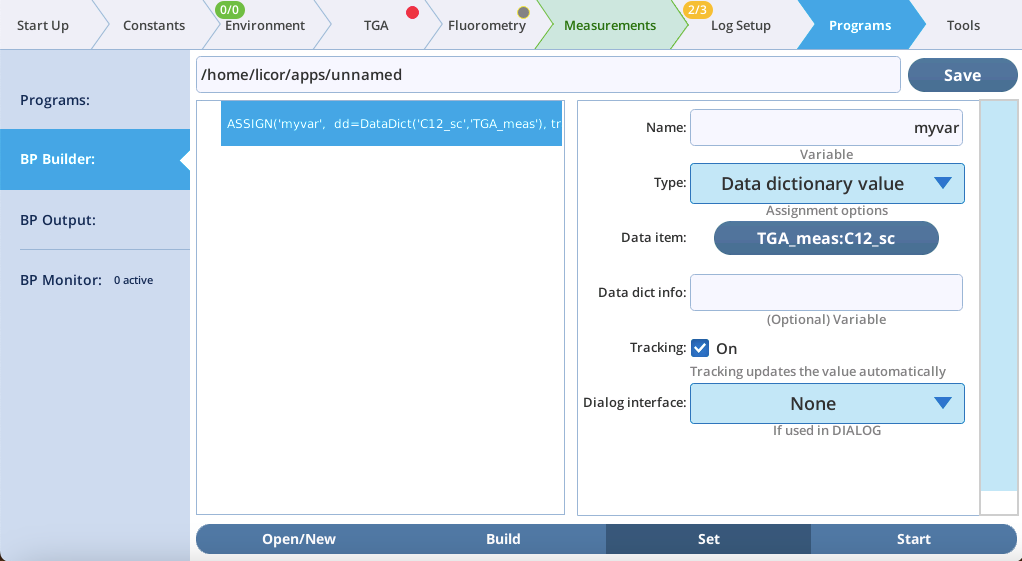
The entries in the LI-6800 Data Dictionary are able to be tracked by BP variables created with ASSIGN. Thus, any variable in any of the groups described in TGA data and groups are available for tracking (Figure 12‑65).
Status dictionary
Similarly, the Status Dictionary provides selected system values to ASSIGN that do not live in the Data Dictionary. TGA support adds one TGA related item: Cfg:isTGA is a true/false flag that says if the system is configured for TGA support. It is found under Misc > Config.
SETCONTROL additions
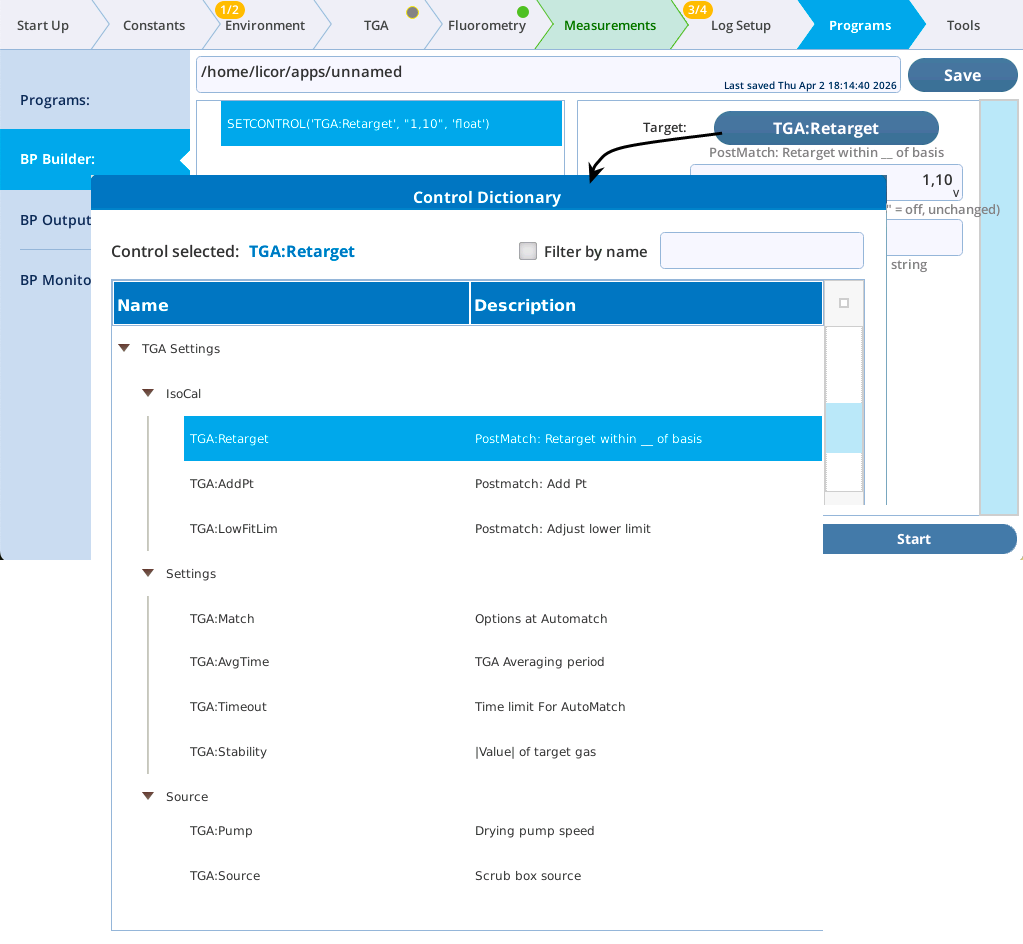
The SETCONTROL command has some additions for supporting TGA integration (Figure 12‑66).
TGA:AddPt
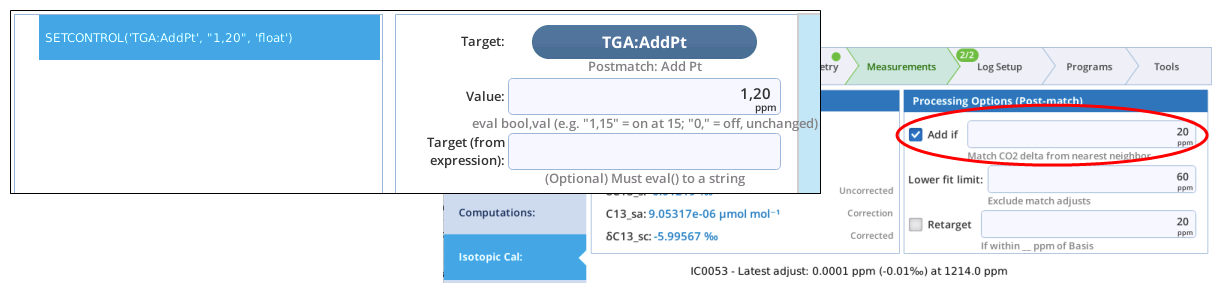
The SETCONTROL TGA:AddPt option (Figure 12‑67) sets the isotopic post match control for determining if the match data should be added to the current isotopic cal or not.
Since this option sets the value in an editable check box, there should be two values: a Boolean (True, False, 1, or 0) to control the check box, and a float to set the contents of the edit box. Just entering a single value will change the edit box value, but not the check box. To just change the check box, and not change the value, include a comma (e.g. 0, will clear the box and leave the value unchanged).
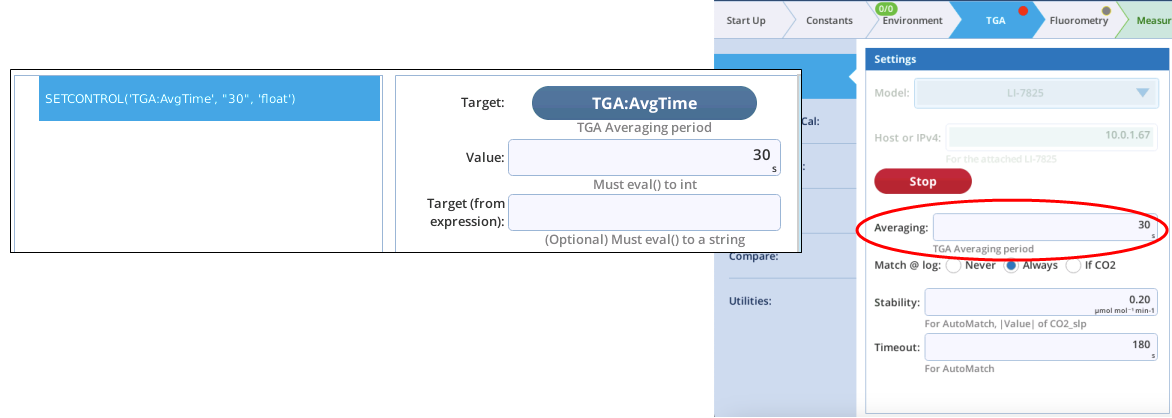
TGA:AvgTime
The SETCONTROL TGA:AvgTime option (Figure 12‑68) sets the averaging time used for the TGA data groups.
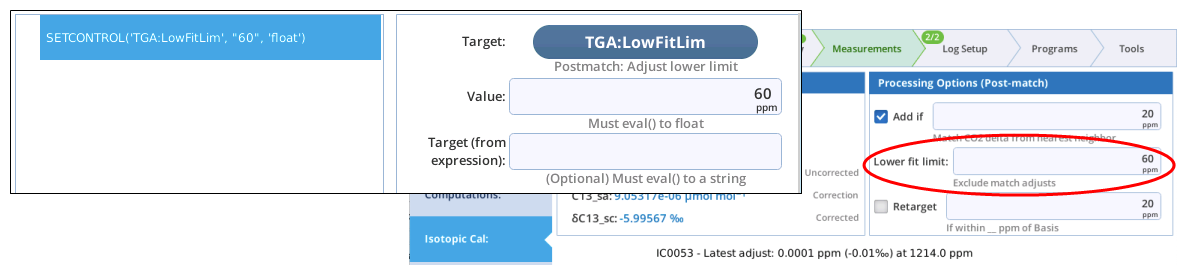
TGA:LowFitLim
The SETCONTROL TGA:LowFitLim option sets the lower limit of C12 for making adjustments to the isotopic calibration following a match.
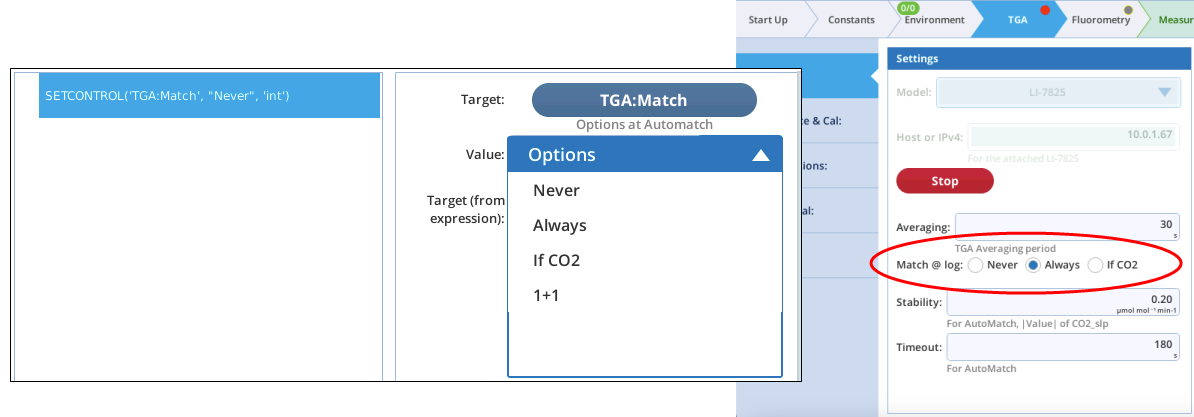
TGA:Match
The SETCONTROL TGA:Match option (Figure 12‑70) sets the TGA matching on Log option. If you select the bottom entry (which evaluates a variable or expression), the entry should evaluate to an integer 0, 1, or 2, where 0 = Never, 1 = Always, and 2 = If CO2.
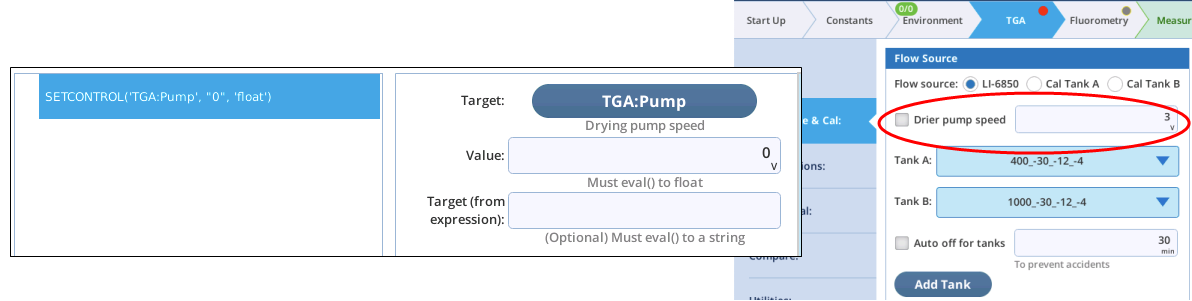
TGA:Pump
The TGA:Pump option for SETCONTROL (Figure 12‑71) sets the pump speed, 0 to 5 V. Although the GUI for this item is a checkable edit box, the BP interface is looking for a single floating point value. Setting this to 0 will clear the Drier pump speed check box in the TGA Source & Cal panel, leaving the edit box value on the GUI unchanged. Setting it to a positive value will both check the box and set the GUI’s edit box value.
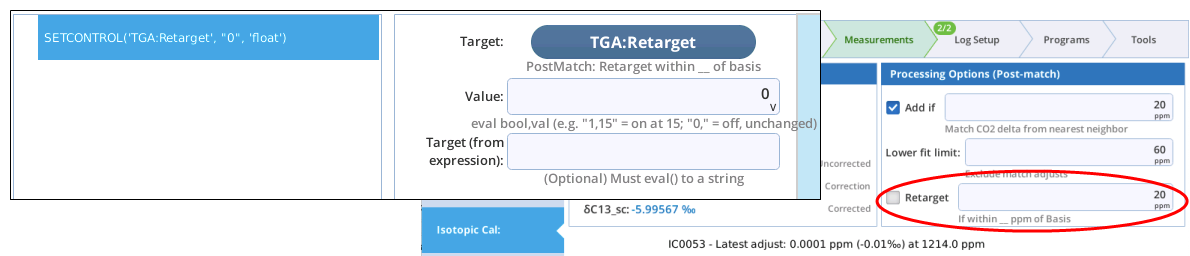
TGA:Retarget
TGA:Source
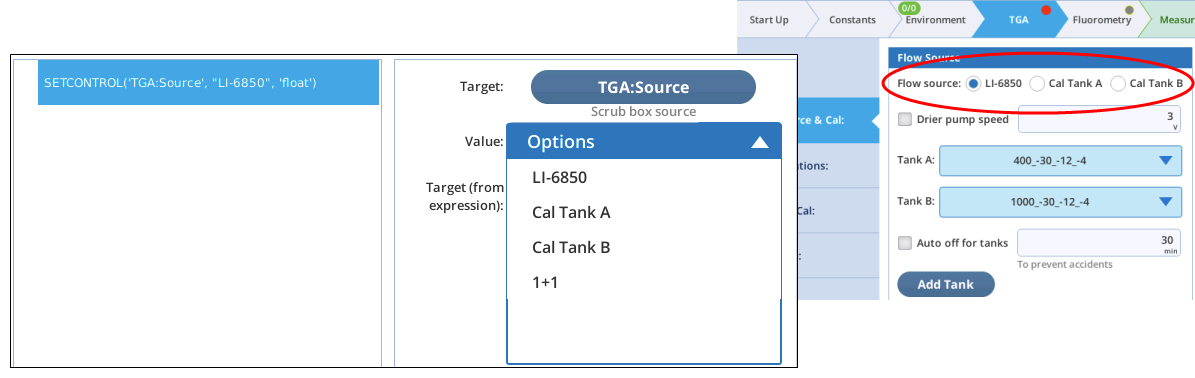
The TGA:Source option for SETCONTROL (Figure 12‑73) picks the air source for the TGA (the radio buttons on the TGA Source & Cal panel). If you select the bottom entry (which evaluates a variable or expression), the entry should evaluate to an integer 0, 1, or 2, where 0 = LI-6850, 1 = Tank A, and 2 = Tank B.
TGA:Stability
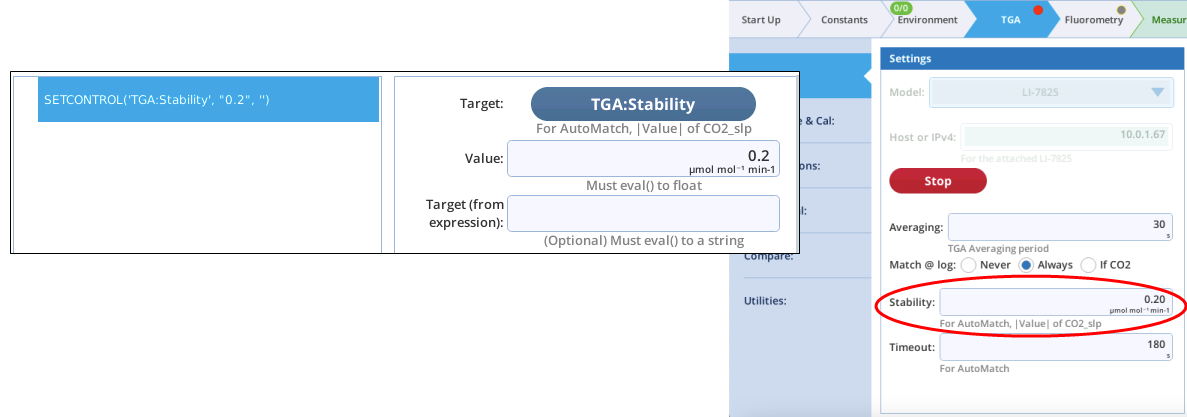
The TGA:Stability option for SETCONTROL (Figure 12‑74) sets the rate of change criteria used for evaluating TGA stability.
TGA:Timeout
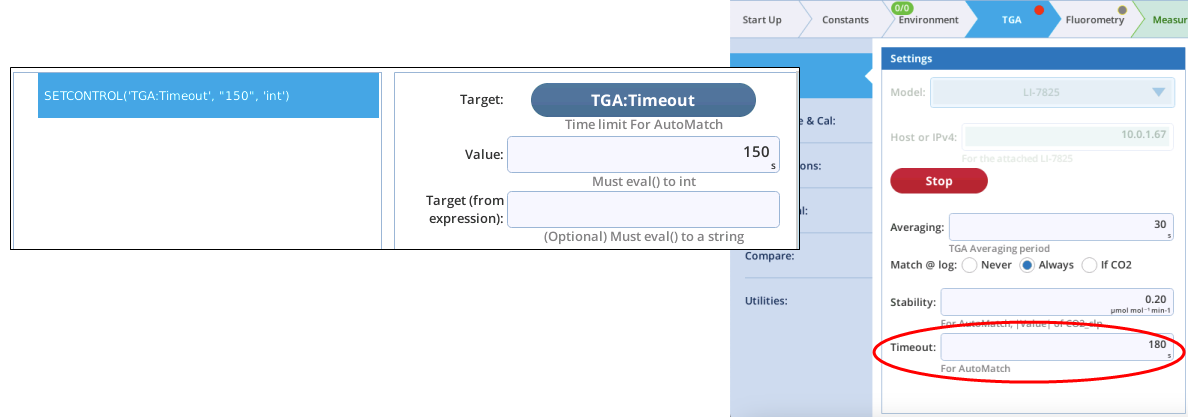
The TGA:Timeout option for SETCONTROL (Figure 12‑75) sets the timeout time for waiting for TGA stability during a match.
DEFINE additions
BP DEFINEs are subroutines accessed via the CALL statement. DEFINES that reside in /home/licor/resources/defines are considered "built-in", and to not have to be present in a BP to be accessible.
TGA support adds four built-in DEFINEs:
TGA_WaitForStability
TGA_WaitForStability waits a fixed minimum time, then returns when TGA stability is achieved, or when the maximum specified elapsed time is reached. It takes two parameters:
-
min_sec→ Time (s) to wait before checking for TGA stability. -
max_sec→ Maximum wait time (s) for TGA stability. will be created.
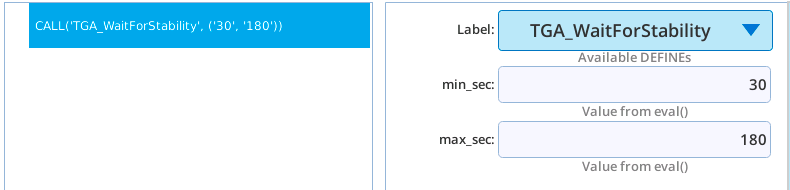
Listing 12‑8. Listing of the TGA_WaitForStability.
from bpdefs import DEFINE, ASSIGN, WHILE, COMMENT

steps=[
    # Subroutine: DEFINE(name, list_of_args)
    DEFINE("TGA_WaitForStability",
            [['min_sec', 'Value'], ['max_sec', 'Value']],
            steps=(
            # Track the TGA stability flag
            ASSIGN("stable",
                topic="'licor/li6850/scripts/tga/status'",
                key="'stable'",
                track=True),
            # Waiting for stability, rechecking once per sec
            WHILE("t<min_sec or (not stable and t < max_sec)",
                var="t",
                mininc="1",
                steps=(
                    # Doing nothing in the loop
                    COMMENT("<Insert steps here>"),
                )
            ),
        )
    ),
]
TGA_MeasureTank
TGA_MeasureTank turns on a tank, waits for TGA stability (using the above TGA_WaitForStability routine), then records a tank measurement (TM) file. The passed parameters are:
-
source→ 1 for Tank A, 2 for Tank B. -
min_sec→ Time (s) to wait before checking for TGA stability. -
max_sec→ Maximum wait time (s) for TGA stability -
tm_id← A variable name (new or existing) that receives the file name of the TM that will be created.
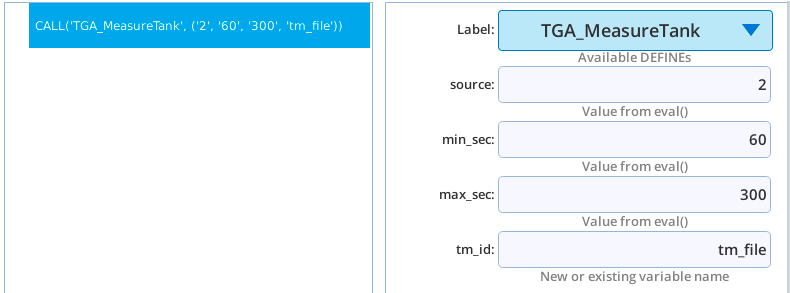
Example usage is found in Capturing a Tank Measurement.
Listing 12‑9. Listing of TGA_MeasureTank.
from bpdefs import DEFINE, SETCONTROL, CALL, EXEC

steps=[
        # Subroutine: DEFINE(name, list_of_args)
        DEFINE("TGA_MeasureTank",
        [['source', 'Value'], ['min_sec', 'Value'], ['max_sec', 'Value'], ['tm_id', 'Reference']],
        steps=(
            # Turn on the tank
            SETCONTROL("TGA:Source","source","int"),
            # Wait for stability
            CALL("TGA_WaitForStability",
                ['min_sec', 'max_sec']),
            # Capture the TM reading
            EXEC(0,source="tm_id = CaptureTankMeas(BP)"),
        )
    ),
]
The actual creation of the TM file is done by using the EXEC command to call the library method CalWithTankMeas.
TGA_Zero_Proc
TGA_Zero_Proc is a complete procedure for zeroing a TGA. It selects the zero tank (if none are defined, it quits), then optionally waits for stability to capture a “before” TM file. It then triggers the TGA’s auto zeroing routine that takes about 5 minutes. When it is done, if an “after” reading was requested, it waits for stability again then captures a second TM file. It then shuts off the zero tank. Two parameters are required.
-
capture_before→ If True (or non-zero), the routine will capture a before zero TM file. -
capture_after→ If True (or non-zero), the routine will capture a post-zero TM file.
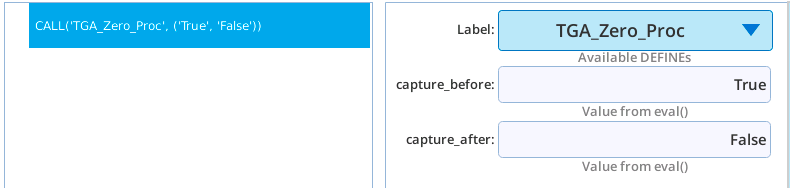
Example usage is found in Doing a Zero Cal.
Listing 12‑10. Listing of TGA_Zero_proc.
from bpdefs import COMMENT, DEFINE, EXEC, IF, SHOW, RETURN, SETCONTROL, CALL, ELSE, WAIT, GROUP, ASSIGN, WHILE

steps=[
    # Subroutine: DEFINE(name, list_of_args)
    DEFINE("TGA_Zero_Proc",
        [['capture_before', 'Value'], ['capture_after', 'Value']],
        steps=(
            # Find the zero tank
            EXEC(0,source="zero_loc=FindZeroTank(BP)"),
            IF("zero_loc not in (1,2)",
                steps=(
                    SHOW(string="'No Zero tank available. Quitting'"),
                    RETURN(),
                )
            ),
            # Turn on the zero gas
            SETCONTROL("TGA:Source","zero_loc","float"),
            SHOW(string="'Turning Zero tank on'"),
            IF("bool(capture_before)",
                steps=(
                    SHOW(string="'Measuring pre-zero TM.'"),
                    # Wait for stability
                    CALL("TGA_WaitForStability",
                        ['60', '180']),
                    # Capture the TM
                    EXEC(0,source="before_id = CaptureTankMeas(BP)"),
                    )
                ),
            ELSE(steps=(
                    # Nominal wait
                    WAIT(dur="60",units="Seconds"),
                    )
            ),
            # Collection: GROUP(enabled, label)
            GROUP("True","Trigger the TGA zero and wait for it to finish",
                steps=(
                    SHOW(string="'Initiating baseline procecure. Takes 5 minutes.'"),
                    # Trigger the action, leave tank on when done
                    EXEC(0,source="BP.publish('licor/li6850/scripts/tga/scrub/action', {'
                        start_baseline':True, 'tank_off':False})"),
                    WAIT(dur="10",units="Seconds"),
                    # Monitor this flag to know when the TG Ais done
                    ASSIGN("base_line_active",
                        topic="'licor/li6850/scripts/tga/unitcal/constants'",
                        key="'Start_Peak_Base_Line_Cal'",
                    track=True),
                    # Wait for the flag to go to 0, check every 2 secs
                    WHILE("base_line_active",
                        mininc="2",
                        steps=(
                            # Nothing to do here
                            COMMENT("<Insert steps here>"),
                        )
                    ),
                    SHOW(string="'TGA reports baseline done.'"),
                )
            ),
            IF("bool(capture_after)",
                steps=(
                    SHOW(string="'Measuring post-zero TM.'"),
                    CALL("TGA_WaitForStability",
                        ['60', '180']),
                    EXEC(0,source="before_id = CaptureTankMeas(BP)"),
                )
            ),
            SHOW(string="'Zero tank off.'"),
            # Tank off, back to normal ops
            SETCONTROL("TGA:Source","LI-6850",""),
        )
    ),
]
TGA_Isotopic_Cal
TGA_Isotopic_Cal launches an isotopic cal (for LI-7825) and optionally waits for it to finish.
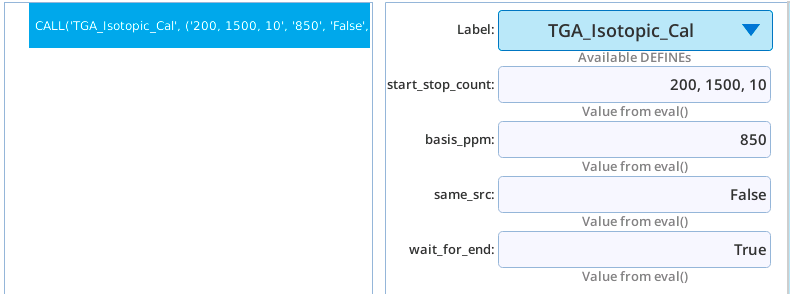
For a parameter description and sample usage, see Launching an Isotopic Cal.
Listing 12‑11. Listing of TGA_Isotopic_Cal.
from bpdefs import DEFINE, SHOW, EXEC, IF, WAIT, ASSIGN, WHILE, COMMENT

steps=[
    # Subroutine: DEFINE(name, list_of_args)
    DEFINE("TGA_Isotopic_Cal",
        [['start_stop_count', 'Value'], ['basis_ppm', 'Value'], ['same_src', 'Value'], ['wait_for_end', 'Value']],
        steps=(
            # Launch the program
            EXEC(0,source="LaunchAutoIsoCal(BP, start_stop_count, basis_ppm, same_src)"),
            IF("wait_for_end",
                steps=(
                    WAIT(dur="5",units="Seconds"),
                    # Watch the sample match status to know when the isotopic cal program is over
                    ASSIGN("match_s",
                        topic="'licor/li6850/scripts/match/state'",
                        key="'MatchValveS'",
                        track=True),
                    # Check it every 2 seconds
                    WHILE("match_s != 100",
                        mininc="2",
                        steps=(
                            # Nothing to do here
                            COMMENT("<Insert steps here>"),
                        )
                    ),
                )
            ),
        )
    ),
]
The actual launch of the isotopic cal is done by using an EXEC command to call the library method “LaunchAutoIsoCal” on page 90.
tga_bp_library Library
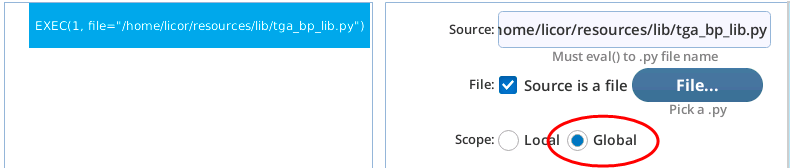
This library file tga_bp_lib.py needs to be included (EXEC) in any BP that uses any the DEFINE additions listed above, or any of the calls described below. Make sure the Scope is set to Global.
CaptureTankMeas
This method does the actual work of capturing a tank reading. It should be called after a tank has been turned and a stable reading obtained.
def CaptureTankMeas(BP):
It takes one parameter (BP, the global variable that points to the current BP), and returns the name of the TM file created (e.g. /home/licor/logs/tga/tanks/events/TG25-01057/TM0335_2026-04-04_15_20_29.json).
An example of its usage is found in Capturing a Tank Measurement.
CalWithTankMeas
This method computes calibration settings for a TGA based on one or more tank readings.
def CalWithTankMeas(BP, tm_list, ask=True):
It takes two parameters, and has a third that is optional:
-
BP - the global variable that points to the current BP
-
tm_list - list of tank measurements.
-
ask - Prompts if True, using dialogs as shown in Figure 12‑45 for one TM in the list, or Figure 12‑46 for more than one TM in the list.
The list of tank measurements is normally just a list of one TM, except in the case of the LI-7825 when using two different concentrations to get an offset and a slope for the span correction.
Unless someone is present to respond to dialogs popping up on the console, be sure to set ask=False in the call, otherwise your BP will wait until the dialog is responded to.
Example usage found in Applying a Tank Measurement.
FindZeroTank
This method finds the tank named Zero.
def FindZeroTank(BP):
It takes 1 parameter:
-
BP - the global variable that points to the current BP
The method returns 1 (for Tank A) or 2 (for Tank B) or 0 (no Zero tanks found).
This method is used in the DEFINE TGA_Zero_Proc.
LaunchAutoIsoCal
This method launches an automated isotopic calibration.
def LaunchAutoIsoCal(BP, start_stop_count, basis, same_src):
It takes 4 parameters:
-
BP - the global variable that points to the current BP.
-
start_stop_count- this should be three values separated by commas: the starting CO2 concentration (ppm), the ending CO2 concentration (ppm), and the number of points to be measured over that range. -
basis- CO2 (ppm) where the TGA was last calibrated. Note: if you enter -1 for this value, the program will look up the appropriate value for you based on the previous TGA cal performed using this LI-6800 console. -
same_src- Usually False, unless the CO2 source has not changed since the previous isotopic cal.
This method is used in the DEFINE TGA_Isotopic_Cal.